Mac futures trading guide · Updated September 9, 2026 · U.S. audience
Best Futures Trading Platforms for Mac 2026: Top 7
The best Futures Trading Platforms for Mac no longer require every trader to build an entire Windows workstation. Browser-based futures terminals, native Apple Silicon applications, professional macOS charting platforms, and cross-platform broker software now give Mac users several serious choices. The important distinction is whether you need native macOS software, browser access, advanced order flow, automated strategies, global futures markets, or simply a reliable execution interface.
This guide compares seven Futures Trading Platforms for Mac for U.S. futures traders in 2026. We distinguish native Mac applications from browser solutions and Windows-only advanced environments because those differences directly affect stability, automation, add-ons, data feeds, and workflow.
Quick answer: Best Futures Trading Platforms for Mac
For a futures-first brokerage ecosystem, NinjaTrader Web is our top choice for Mac users who want integrated brokerage access without running Windows, although the full NinjaTrader Desktop environment remains Windows-focused. Tradovate is excellent for cloud-first trading. MotiveWave stands out for native Mac order flow and technical analysis. Interactive Brokers TWS is strongest for global market breadth. EdgeProX is a compelling native Mac order-flow platform. Bookmap specializes in liquidity visualization, while TradingView provides one of the simplest browser-first charting workflows.
Explore NinjaTrader for Futures
Affiliate link for eligible users. NinjaTrader Web can be accessed from a Mac browser. Verify current pricing, eligibility, data fees, and margins before trading.
Table of contents
- Best Mac futures platforms at a glance
- Native Mac vs browser vs Windows virtualization
- 1. NinjaTrader Web
- 2. Tradovate
- 3. MotiveWave
- 4. Interactive Brokers TWS
- 5. EdgeProX
- 6. Bookmap
- 7. TradingView
- Best Mac platform for order flow
- Best Mac platform for automation
- Costs to consider
- How to choose
- FAQ
- Final verdict
Best Futures Trading Platforms for Mac at a glance
| Rank | Platform | Mac access | Best for | Main limitation |
|---|---|---|---|---|
| 1 | NinjaTrader | Web browser + mobile | Integrated futures brokerage | Full NinjaTrader Desktop is Windows-focused |
| 2 | Tradovate | Cloud/browser + Mac workflow | Cloud-first futures trading | Less desktop customization than deep Windows platforms |
| 3 | MotiveWave | Native macOS | Order flow and technical analysis | Advanced editions can increase total cost |
| 4 | Interactive Brokers TWS | Native Intel and Apple Silicon versions | Global futures and multi-asset access | Complex interface |
| 5 | EdgeProX | Native macOS | Professional order flow | Requires compatible brokerage/data setup |
| 6 | Bookmap | Mac desktop | Liquidity heatmaps and market depth | Real-time futures data adds cost |
| 7 | TradingView | Browser + desktop application | Simple cross-device charting | Broker-specific features vary |
The best Futures Trading Platforms for Mac therefore depend on what “Mac compatible” means to you. A browser platform may be perfect for discretionary execution, while a systematic trader may still require a Windows environment for a specific automation framework.
Native Mac vs browser vs Windows virtualization
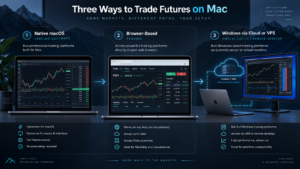
Before selecting among Futures Trading Platforms for Mac, separate three different approaches.
Native macOS software
Platforms such as MotiveWave, Interactive Brokers TWS, and EdgeProX provide Mac-compatible installed applications. Native software is attractive for multi-monitor workstations, advanced charting, professional DOM tools, and users who do not want to depend entirely on a browser.
Browser-based futures platforms
NinjaTrader Web, Tradovate, and TradingView can remove much of the operating-system problem. NinjaTrader officially states that NinjaTrader Web can be accessed from a PC or Mac browser. This makes browser access one of the simplest solutions for traders who want to stay inside macOS.
Windows virtualization or VPS
Some advanced futures software remains Windows-centric. A Mac trader who needs the full NinjaTrader Desktop environment, Sierra Chart, or another Windows-only terminal can use a Windows machine, VPS, or virtualization solution. This adds complexity, so it should only be done when a specific feature justifies it.
1. NinjaTrader Web — Best futures-first brokerage ecosystem
Among Futures Trading Platforms for Mac, NinjaTrader deserves special treatment because its most powerful Desktop software is associated with Windows, but its current platform ecosystem is no longer desktop-only.
NinjaTrader Web is cloud-based and officially accessible from a PC or Mac browser. Mac traders can view futures charts, monitor prices, manage accounts, and place trades without installing the Windows Desktop product. NinjaTrader also offers mobile access for iPhone and Android.
The main advantage is integration. NinjaTrader is not merely a charting application: its current U.S. offering combines futures brokerage, platform access, simulation, commissions, market data, and account management.
The current NinjaTrader pricing structure includes a Free plan with a $0 monthly plan fee, a $99 Monthly plan, and a $1,499 Lifetime plan. The published base commission decreases as the plan level increases. Exchange, NFA, clearing, market-data, and other applicable fees remain additional.
The limitation for Mac power users is important. NinjaTrader Desktop remains the deeper environment for NinjaScript/C#, Strategy Builder, Strategy Analyzer, advanced add-ons, complex workspaces, and many specialist order-flow tools. A trader requiring those desktop-specific capabilities may still need Windows.
See our NinjaTrader vs Tradovate 2026 comparison if you are deciding between the two related futures ecosystems.
2. Tradovate — Best cloud-first Mac futures workflow
Tradovate remains one of the most natural Futures Trading Platforms for Mac for users who prefer cloud-oriented futures trading. Its architecture was designed around access from multiple devices rather than making a Windows workstation mandatory.
Tradovate provides browser-based trading along with desktop and mobile options. For Mac traders, the appeal is straightforward: futures charts, DOM functionality, order management, simulation, and account access can be used without building a Windows virtual machine solely for futures execution.
NinjaTrader acquired Tradovate in 2022, so the relationship between the two platforms is closer than a typical broker comparison. However, the interfaces and workflows remain different enough that device preference can determine which one feels better.
Tradovate is especially attractive to discretionary traders who prioritize portability over deep custom C# desktop development.
3. MotiveWave — Best native Mac platform for technical analysis and order flow
MotiveWave is one of the strongest native Futures Trading Platforms for Mac for traders who want advanced technical analysis without using Windows.
The platform supports macOS and is known for professional charting, Elliott Wave analysis, volume analysis, footprint-style tools, DOM functionality, volume profiles, replay, and broker/data integrations. More advanced editions add deeper order-flow functionality and strategy tools.
MotiveWave is especially relevant to a trader who would otherwise consider Sierra Chart, ATAS, Bookmap, or NinjaTrader Desktop but strongly prefers native macOS software.
The trade-off is complexity and cost. Professional order-flow features may require a higher software tier plus a compatible real-time futures data feed.
For a direct comparison, read our NinjaTrader vs MotiveWave 2026.
4. Interactive Brokers TWS — Best for global futures markets
Interactive Brokers Trader Workstation is one of the most established Futures Trading Platforms for Mac for traders who want futures alongside a much broader global brokerage account.
Interactive Brokers currently provides TWS downloads for both Apple Silicon M-series Macs and Intel Macs. Its published system requirements list macOS support, making it a genuine native Mac solution rather than a browser workaround.
TWS provides futures trading alongside stocks, options, currencies, bonds, and other instruments across international markets. This makes it particularly attractive for traders who need global exchange access or manage several asset classes from one account.
The main disadvantage is usability. TWS contains a very large number of tools, order types, windows, and settings. A trader who only wants CME Micro futures may find a futures-specialist interface simpler.
See our NinjaTrader vs Interactive Brokers 2026 comparison for the futures-specific differences.
5. EdgeProX — Best value native Mac order-flow platform
EdgeProX has become one of the more interesting Futures Trading Platforms for Mac for dedicated order-flow traders.
EdgeClear officially provides native macOS support for EdgeProX, including Apple Silicon compatibility. The platform currently offers footprint analysis, Orderflow Heat Map, Advanced DOM, Volume Profile, Market Profile/TPO, MBO support, replay, simulation, cloud workspaces, and more than 300 built-in studies and indicators.
EdgeClear currently advertises a 14-day demo followed by EdgeProX at $34.99 per month. Market-data and brokerage costs remain separate.
This is a strong option for traders who want MotiveWave-style professional analytics while working through an EdgeClear brokerage and data configuration.
Read NinjaTrader vs EdgeClear 2026 for the broader brokerage comparison.
6. Bookmap — Best Mac platform for liquidity heatmaps
Bookmap is one of the most specialized Futures Trading Platforms for Mac. Its main strength is not conventional charting but visualization of market depth, resting liquidity, executed volume, and order-book behavior.
The platform can be used on Mac and supports compatible futures data and broker connections. Traders can analyze liquidity heatmaps, volume bubbles, DOM behavior, replay data, and specialized order-flow indicators.
Bookmap is particularly useful for scalpers and discretionary traders whose methodology depends on observing changes in visible liquidity.
The software subscription is only one part of the cost. Real-time futures depth generally requires a compatible paid data service or exchange entitlement, and premium add-ons can create additional expense.
See our NinjaTrader vs Bookmap 2026 comparison for more detail.
7. TradingView — Best browser-first charting experience
TradingView is one of the easiest Futures Trading Platforms for Mac to use when browser compatibility is more important than a proprietary broker desktop.
The platform runs in a modern web browser and also offers desktop applications. Its main advantages include responsive charts, extensive community indicators, Pine Script, alerts, multi-device synchronization, and integration with supported futures brokers.
NinjaTrader and other futures brokers can connect through TradingView’s trading infrastructure when supported by the account configuration. This lets Mac users keep TradingView as the visual interface while choosing a separate brokerage relationship.
The limitation is that TradingView does not reproduce every function of a broker’s native platform. Advanced order management, automation, DOM behavior, add-ons, or historical-testing features may differ.
Read our NinjaTrader vs TradingView 2026 comparison before choosing this workflow.
Compare NinjaTrader Futures Plans
Affiliate link. Mac users can access NinjaTrader Web through a supported browser. Full Desktop functionality differs from the web platform.
Best Futures Trading Platforms for Mac for order flow
Order-flow traders have fewer native choices than standard chart users, but the situation is improving.
MotiveWave, EdgeProX, and Bookmap are the strongest native or Mac-compatible options in this guide for professional volume and liquidity analysis. MotiveWave provides a broad trading and analytical workstation. EdgeProX combines footprint, heatmap, DOM, Volume Profile, TPO, and MBO tools. Bookmap specializes more aggressively in real-time liquidity visualization.
NinjaTrader also offers serious order-flow capabilities, but traders who specifically need the full NinjaTrader Desktop ecosystem should remember that the deepest Windows desktop experience is different from NinjaTrader Web.

Best Futures Trading Platforms for Mac for automated trading
Automation is where choosing Futures Trading Platforms for Mac becomes more complicated.
NinjaTrader’s NinjaScript/C# environment is powerful, but the full NinjaTrader Desktop environment is Windows-oriented. Mac users who require NinjaScript automation may therefore choose a Windows workstation, virtual machine, or VPS while continuing to use a Mac as the primary computer.
Interactive Brokers supports API-based workflows, although available development components can differ by operating system. MotiveWave provides its own development environment and broker integrations. TradingView uses Pine Script for indicators, strategies, alerts, and supported automation workflows, but Pine Script is not equivalent to running a complete broker-native C# execution engine.
The correct platform depends on whether your automation runs inside the charting software, through an external API, or on a remote server.
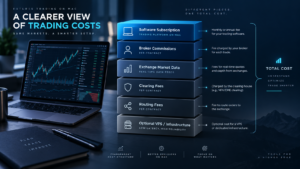
What do Futures Trading Platforms for Mac actually cost?
Software price alone is a poor way to compare Futures Trading Platforms for Mac. The complete monthly trading stack can include:
- Platform subscription.
- Broker commissions.
- Exchange market-data fees.
- Level I or Level II data.
- Clearing fees.
- NFA and regulatory fees.
- Order-routing charges.
- Premium indicators or add-ons.
- VPS or virtualization costs.
| Platform | Software model | Potential extra costs |
|---|---|---|
| NinjaTrader | Free, $99 Monthly, $1,499 Lifetime futures plans | Trading commissions, exchange data, clearing, NFA, applicable account/routing fees |
| Tradovate | Plan-based futures ecosystem | Commissions, exchange data, applicable account fees |
| MotiveWave | Software edition/subscription | Broker, market data, advanced edition |
| Interactive Brokers | Broker platform access | Futures commissions and exchange data |
| EdgeProX | $34.99/month after current demo | Broker commissions, exchange data, feed/connection costs |
| Bookmap | Free and paid software plans | Real-time futures depth, exchange data, premium add-ons |
| TradingView | Free and paid charting plans | Broker commissions, exchange data, higher charting tiers |
How to choose Futures Trading Platforms for Mac
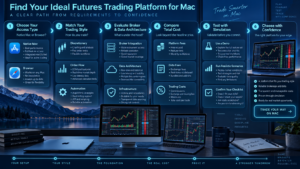
Use the following decision order when comparing Futures Trading Platforms for Mac.
1. Decide whether you need native macOS
If browser access is sufficient, your platform selection is much wider. If you require an installed native Mac workstation, MotiveWave, Interactive Brokers TWS, EdgeProX, and other true macOS applications become more important.
2. Identify your trading style
A discretionary DOM scalper has different needs from an automated strategy developer. Order-flow users should prioritize Level II handling, footprint charts, replay, heatmaps, and DOM performance. Systematic traders should prioritize APIs, backtesting, deployment, and monitoring.
3. Choose the broker and data architecture
Some Futures Trading Platforms for Mac combine software and brokerage. Others sit above a separate broker and market-data connection. Understand which company holds the account, which service provides data, and which component routes the order.
4. Calculate all-in costs
A cheaper platform can become more expensive after data feeds, exchange subscriptions, routing, and add-ons are added.
5. Test before funding
Use demo, replay, or simulation where available. Confirm that charts, order types, brackets, DOM behavior, keyboard shortcuts, and data work correctly on your Mac before live trading.
Frequently asked questions
What are the best Futures Trading Platforms for Mac in 2026?
Our top options are NinjaTrader Web, Tradovate, MotiveWave, Interactive Brokers TWS, EdgeProX, Bookmap, and TradingView. The best choice depends on whether you need brokerage integration, native macOS software, browser trading, order flow, automation, or global market access.
Does NinjaTrader work on Mac?
Yes, with an important distinction. NinjaTrader officially provides a Web platform that can be accessed through a PC or Mac browser, plus mobile apps. The full NinjaTrader Desktop environment remains the deeper workstation for NinjaScript and advanced add-ons and is Windows-focused.
What is the best native Mac futures platform?
MotiveWave is one of the strongest native Futures Trading Platforms for Mac for advanced technical analysis and order flow. EdgeProX is another compelling native option, especially for futures order-flow traders using EdgeClear infrastructure.
Can Interactive Brokers TWS run natively on Apple Silicon?
Yes. Interactive Brokers currently provides separate TWS downloads for Apple Silicon M-series Macs and Intel-based Macs.
Can I trade futures through TradingView on a Mac?
Yes, when using a supported futures broker and eligible account connection. TradingView runs through a browser or desktop application, making it highly Mac-friendly.
What is the best Mac platform for footprint charts?
MotiveWave and EdgeProX are strong candidates. Bookmap is particularly strong for liquidity heatmaps, while its visualization style differs from a conventional footprint-first workstation.
Do I need Windows for serious futures trading?
No. Several professional Futures Trading Platforms for Mac work natively or through the browser. Windows is mainly necessary when your workflow specifically depends on Windows-only software such as the full NinjaTrader Desktop environment or another specialized application.
Is using a Windows VPS with a Mac a good idea?
It can be useful for automated or Windows-specific trading systems because the trading software can remain online even when your Mac is closed. However, a VPS adds another cost and infrastructure layer and should be tested carefully before live trading.
Which Mac futures platform is easiest for beginners?
Browser-first products such as NinjaTrader Web, Tradovate, and TradingView are generally easier to start with than highly configurable professional platforms. Beginners should prioritize simulation and risk education over advanced indicators.
Final verdict: Best Futures Trading Platforms for Mac 2026
The market for Futures Trading Platforms for Mac is substantially better than it was when professional futures traders were effectively forced onto Windows.
NinjaTrader Web is our strongest futures-first choice for Mac traders who want integrated brokerage access and are comfortable using the browser. Tradovate remains excellent for cloud-first execution. MotiveWave is a standout native macOS workstation for technical and order-flow traders. Interactive Brokers TWS is better suited to traders requiring global futures and multiple asset classes. EdgeProX provides an attractive native order-flow alternative, Bookmap specializes in liquidity analysis, and TradingView delivers one of the most convenient browser-based charting experiences.
The best Futures Trading Platforms for Mac therefore depend less on the Apple logo on your computer and more on the architecture of your trading process. Decide whether you need native software, browser access, C# automation, footprint analysis, global markets, or a specialist DOM before choosing a broker or paying for software.
Test the complete setup in simulation before risking capital. Futures are leveraged instruments, and platform quality does not eliminate execution risk, leverage risk, connectivity failures, or trading losses.
Affiliate link. NinjaTrader Web works through a supported Mac browser. Confirm current feature availability, pricing, commissions, data subscriptions, and account requirements directly with NinjaTrader.
Official sources checked
NinjaTrader platform and Mac browser access
Interactive Brokers TWS Mac downloads
EdgeProX Mac compatibility and features
MotiveWave official platform
TradingView official platform
Editorial scope: This guide is based on public provider documentation and current 2026 platform information checked September 9, 2026. Platform compatibility, pricing, supported brokers, data feeds, and operating-system requirements can change.
Affiliate disclosure: TradeboticsAI may receive compensation from qualifying NinjaTrader referrals through marked affiliate links. Readers are not paid or incentivized to register or trade.
Risk disclosure: Futures trading involves substantial risk and may result in losses greater than the amount initially committed in some circumstances. Historical, simulated, replay, and paper-trading results are hypothetical and do not predict future results. This material is educational and is not personalized financial advice.