Futures Data Feeds 2026: 7 Best Options for CME Traders
Futures data feeds are the infrastructure that deliver prices, trades, depth-of-market updates and historical data to your trading platform. In 2026, the best choice depends on whether you care most about low-latency DOM trading, Market by Order, platform compatibility, historical backfill, API access or simple charting. This guide compares Rithmic, CQG, dxFeed, Kinetick, DTN IQFeed, Trading Technologies and direct/exchange-authorized data access for U.S. futures traders.
Affiliate Disclosure: TradeboticsAI may receive compensation when readers complete qualifying actions through certain links. NinjaTrader buttons on this page are affiliate links. Compensation does not determine the provider rankings or editorial conclusions.
Explore NinjaTrader for Futures Trading
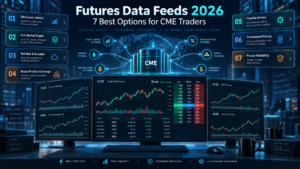
Best Futures Data Feeds 2026 Comparison
The table below summarizes the role each option can play. Availability is not identical at every broker or platform, and exchange permissions can change what data you actually receive. Treat this as a selection framework rather than a promise that every connection is available in every account.
| Provider / Route | Best For | Real-Time Data | Depth / MBO | Historical Data | Execution Routing |
|---|---|---|---|---|---|
| Rithmic | DOM, order flow, prop-firm workflows | Yes | Depth and MBO available | Available by service/setup | Yes |
| CQG | Broad brokerage/platform connectivity | Yes | DOM available | Strong historical-data ecosystem | Yes |
| dxFeed | Standalone/API and analytical workflows | Yes | Depth products available | Historical and replay services | Depends on integration |
| Kinetick | NinjaTrader data and backup feed | Subscription | Depends on entitlement | Yes | No direct brokerage routing |
| DTN IQFeed | Broad retail market analysis and history | Yes with entitlements | Futures depth add-ons available | Yes | Data-focused |
| Trading Technologies | Professional/institutional trading | Yes | Market depth | Tick data available | Yes |
| Direct / Licensed Distributor | Custom institutional infrastructure | Yes | Depends on licensed product | Depends on vendor | Separate design decision |
How Futures Data Feeds Work
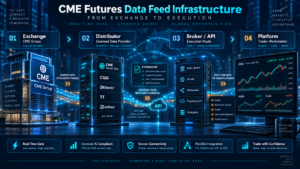
Futures data feeds sit between an exchange or authorized distributor and the software that displays or processes the market. A feed can carry last-trade prices, bid and ask quotes, volume, settlement information and order-book depth. Some services also provide historical tick data, backfill, replay, analytics or order routing.
The exchange is the original source of the data, but most retail traders do not connect directly to an exchange market-data platform. Instead, they receive data through a brokerage relationship, platform connection or licensed distributor. CME Group maintains a directory of licensed market-data distributors and publishes its own market-data policies and fee schedules.
This distinction matters because two traders using the same front-end platform may not be using the same underlying connection. One account may receive data through a broker-provided route, while another uses a dedicated data vendor. The visible chart can look similar even though the infrastructure, historical backfill, depth and routing path differ.
1. Rithmic: Best for DOM and Detailed Order-Flow Workflows
Rithmic is one of the most recognizable futures data feeds for active traders, especially in environments where tick-by-tick updates, depth and low-latency order routing matter. Rithmic states that its exchange connectivity includes CME, CBOT, NYMEX and COMEX and that available data includes top-of-book, market depth, Market by Order and historical data.
Among futures data feeds, that combination makes Rithmic particularly relevant to DOM traders, footprint users and workflows that rely on detailed liquidity information. NinjaTrader also describes Rithmic as a professional futures data and routing platform widely used in the futures prop-trading space. When a prop firm controls the connection, however, the trader may not be able to choose a different feed independently.
Who Rithmic Is Best For
Rithmic is most compelling for traders who actively watch order-book behavior, use a compatible prop-firm account, or need a data/routing stack designed around futures. It can be overkill for a trader who only checks higher-time-frame candles and never uses depth.
Before subscribing through any broker or firm, verify the exact Rithmic service, exchange entitlements, platform compatibility and whether historical data requirements are covered. The word “Rithmic” alone does not tell you every feature enabled on a specific account.
2. CQG: Best All-Around Brokerage and Platform Connectivity
CQG is one of the established futures data feeds combining real-time market data, analytics, APIs, historical data products and trading connectivity. Its Data API supports real-time last trade, best bid/offer and depth-of-market data, while CQG’s historical-data products cover futures and other asset classes with both daily and intraday datasets.
Among futures data feeds, CQG is a practical choice when your broker and preferred platform already support the ecosystem. That can reduce the number of separate services you need to manage. The main question is not whether CQG is “fast enough” in the abstract, but whether the exact broker/platform route gives you the depth, history and reliability your strategy needs.
CQG vs Rithmic
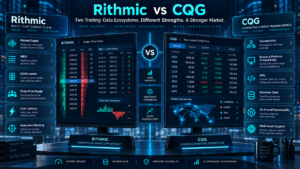
Rithmic is frequently selected for highly detailed order-flow workflows, while CQG can be attractive for broad connectivity and established brokerage integrations. Do not assume that either is universally faster in your location: network path, broker infrastructure, server location, platform processing and internet quality can matter as much as the provider label.
For a trader who uses standard charts, a DOM and live execution without specialized MBO requirements, CQG can be a very balanced option. For a workflow explicitly built around MBO or a Rithmic-based prop account, Rithmic may fit better.
3. dxFeed: Best for Standalone Data and API-Centric Analysis
dxFeed provides U.S. futures and futures-options market data, including CME Group markets. Its futures offering includes real-time, delayed, historical replay and historical-download services, with data types that can include bid/ask, time and sales, price-level book and full order depth depending on the product.
Among futures data feeds, this makes dxFeed different from services chosen primarily because they come bundled with a brokerage connection. It can make sense when market analysis, custom applications or data consumption are the primary goal and order routing is handled separately.
For developers, the important questions are API format, entitlement model, latency requirements, historical retention and redistribution rights. If you are building a SaaS tool, scanner or research pipeline, market-data licensing can be more important than the headline subscription price.
4. Kinetick: Best Separate Data Source for NinjaTrader Users
Kinetick is one of the futures data feeds closely tied to NinjaTrader because it is operated by NinjaTrader and is designed as a market-data service that integrates with the NinjaTrader ecosystem. NinjaTrader states that Kinetick offers end-of-day data and subscription-based real-time and historical data, making it useful for traders who want a dedicated data connection rather than relying only on a brokerage feed.
For NinjaTrader users comparing futures data feeds, Kinetick can also serve as a redundancy or historical-data option. NinjaTrader supports preferred connections for real-time and historical data, so a user can design a setup where different connections handle different functions when supported.
Kinetick is less compelling if your broker-provided data already covers every requirement at a lower total cost. Its value is stronger when independence, backup data or a specific historical-data workflow justifies another subscription.
If your feed choice is part of a research workflow, compare it with our Best Futures Backtesting Platforms 2026 guide before committing to a data stack.
5. DTN IQFeed: Best for Broad Retail Market Analysis and History
DTN IQFeed is one of the futures data feeds built primarily around data consumption, covering stocks, futures, forex and options. DTN currently advertises a base service with tick-by-tick and historical market data, streaming news and third-party software compatibility, while exchange-specific real-time entitlements and depth can add separate requirements.
Compared with broker-centric futures data feeds, IQFeed is attractive when you want one analytical data service across several asset classes or need historical backfill for research. DTN lists 180 calendar days of tick history, more than 11 years of one-minute OHLCV data and long daily histories on its current product page.
Its trade-off is that a dedicated data subscription can increase total monthly cost if your broker already provides adequate live futures data. It is therefore best evaluated as a research/data product, not merely as a replacement quote stream.
6. Trading Technologies: Best for Professional and Institutional Workflows
Trading Technologies is one of the professional-oriented futures data feeds and provides market data and execution infrastructure for futures and other markets. TT states that its market-data service covers more than 40 exchanges and execution venues and supports real-time data, historical tick data, FIX market data and normalized APIs.
That makes TT one of the more professional-oriented futures data feeds in this comparison. Its appeal increases when the same organization needs market data, execution, APIs, risk controls and multi-market infrastructure rather than a simple retail chart feed.
For an individual trader, TT may be more infrastructure than necessary. For a professional desk, algorithmic team or firm integrating FIX and server-side systems, the broader toolchain can be the reason to choose it.
7. Direct and CME-Licensed Distributor Access: Best for Custom Infrastructure
The seventh option in this futures data feeds comparison is not one retail brand. It is the direct or exchange-authorized distribution route used when a firm needs to control its own data architecture. CME Group lists hundreds of licensed distributors that can provide real-time, delayed and end-of-day market data through terminals, feeds, web services and other delivery methods.
For most individual traders, this route is unnecessary. For a fintech product, proprietary trading operation or institutional application, however, the licensing and redistribution rights can determine the architecture. A cheap retail login is not automatically licensed for a commercial product that redistributes or displays exchange data to other users.
When evaluating futures data feeds for software rather than personal trading, separate four questions: who supplies the data, who is licensed to display or redistribute it, what your users are entitled to see, and whether the application is display, non-display, simulated or live. CME’s information policies distinguish among these use cases.
Futures Data Feeds: Level 1 vs Level 2 vs Market by Order
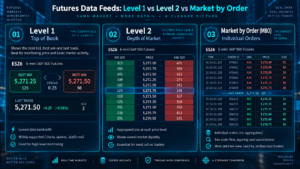
When comparing futures data feeds, Level 1 usually focuses on the best bid, best ask and last trade. It is enough for many chart-based strategies, swing traders and systems that do not use order-book structure. Paying for deeper data does not automatically improve a strategy that never consumes it. Use our Futures Tick Value Calculator 2026 when comparing contract economics after choosing the correct data setup.
For futures data feeds, Level 2 or depth-of-market adds multiple price levels on the bid and ask. This is useful for DOM trading, liquidity analysis and certain order-flow tools. The number of levels and exact data representation depend on the exchange entitlement and feed.
Market by Order goes further by exposing individual order information within the order book rather than only aggregated size at a price level. Rithmic specifically lists MBO among the data available for CME Group connectivity. Not every platform can display or exploit that information, so verify the entire chain before paying for it.
If your priority is execution infrastructure, compare this guide with our Best Futures Trade Copiers 2026 guide, especially when one market-data connection must support multiple accounts.
Futures Data Feed Costs and Hidden Fees
When comparing futures data feeds, the sticker price is rarely the whole cost. A setup can include a provider fee, exchange market-data fees, platform subscription, brokerage technology fee, routing fee, API fee, historical-data package or additional login charge.
CME Group publishes market-data fee lists and distinguishes professional from qualifying non-professional users. Your classification can materially affect the exchange fees you pay. A vendor’s advertised base price therefore may not equal your final monthly total.
1. Exchange Entitlements
CME, CBOT, NYMEX and COMEX data can be packaged separately or together depending on the distributor. Confirm whether you need top-of-book or market depth and whether your account qualifies for non-professional rates.
2. Platform or Connectivity Add-Ons
A feed may be technically supported but require a paid platform add-on, broker relationship or specific account type. Compatibility on a marketing page does not guarantee zero additional cost.
3. Historical Data
Real-time quotes and historical backfill are separate requirements. Some traders discover this only after opening a chart and finding that the history they need is unavailable, limited or delivered by another connection.
4. Multiple Logins and Redundancy
If you run a desktop, VPS and development machine simultaneously, check the login policy. A second concurrent session may require another credential or subscription. This matters for automated systems and remote infrastructure.
5. Professional Classification
Do not select “non-professional” merely because it is cheaper. Exchange classification rules apply, and users should answer provider questionnaires accurately.
See NinjaTrader Futures Trading Options
Best Futures Data Feeds by Use Case
Best for DOM Scalping: Rithmic
Rithmic’s depth and MBO capabilities make it a strong candidate when your decision process depends on the order book. The platform must still support the data features you intend to use.
Best for Broad Broker/Platform Compatibility: CQG
CQG is attractive when you want established connectivity, depth, real-time data and a large historical-data ecosystem without designing a custom institutional stack.
Best for Standalone Data/API Analysis: dxFeed
dxFeed fits research applications and custom data consumption where real-time, delayed, replay or historical services can be selected independently of a traditional retail trading front end.
Best for NinjaTrader Backup Data: Kinetick
Kinetick can complement a NinjaTrader setup when you want an independent data source or need to separate historical and real-time connection preferences.
Best for Broad Research Coverage: DTN IQFeed
IQFeed is built around data consumption rather than brokerage execution and can suit traders researching multiple asset classes and large historical datasets.
Best for Professional Infrastructure: Trading Technologies
TT makes more sense when FIX, normalized APIs, professional execution and multi-exchange workflows are core requirements.
Best for a Commercial FinTech Product: Licensed Distribution
If you are building software for other users, start with licensing rights instead of retail subscription price. The cheapest personal feed can become the wrong architectural choice if redistribution is not permitted.
Futures Data Feeds Pros and Cons
| Option | Pros | Cons / Limitations |
|---|---|---|
| Rithmic | MBO, depth, futures-focused routing, prop-firm relevance | Availability and features depend on broker/firm setup |
| CQG | Broad ecosystem, depth, APIs, historical products | Exact cost/features vary by broker and package |
| dxFeed | Flexible API/data services, replay and history | Execution may require a separate integration |
| Kinetick | NinjaTrader integration, EOD and subscription data | Can duplicate data already supplied by a broker |
| DTN IQFeed | Broad coverage, streaming data, extensive history | Dedicated subscription plus exchange entitlements can raise cost |
| Trading Technologies | Professional APIs, FIX, market data and execution stack | More complex than many retail traders need |
| Licensed Distributor / Direct Route | Commercial flexibility and architecture control | Licensing, engineering and compliance complexity |
How to Choose Futures Data Feeds Without Overpaying
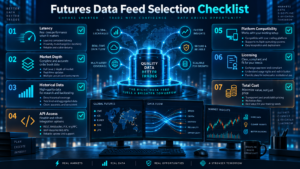
To choose futures data feeds, start with the strategy, not the provider logo. If your system uses only one-minute bars, you probably do not need the same infrastructure as an NQ scalper watching every DOM update. If you backtest tick-level strategies, historical quality may matter more than the live interface.
Next, verify your platform. A technically excellent feed is useless if your preferred charting or execution software cannot consume the required data type. Then verify your broker, because some connections are tied to the brokerage or prop-firm relationship.
Third, separate market data from order routing. Some futures data feeds are tightly integrated with execution; others are primarily data services. Your live orders must follow the route supported by the broker even if your charts use another source.
Fourth, decide whether you need historical tick data, bid/ask history, depth, replay or continuous-contract construction. For strategy research, see our Best Futures Backtesting Platforms 2026. For always-on automated trading infrastructure, see Best Futures Trading VPS 2026.
Finally, test the complete setup before relying on it live. Check reconnect behavior, symbol rollover, timestamp consistency, historical gaps, DOM updates and what happens when one connection fails. A second feed can improve resilience, but only if your platform is configured to use it correctly. To model explicit trading costs separately from data costs, use our Futures Commission Calculator 2026.
Who Should Use a Dedicated Futures Data Feed?
Dedicated futures data feeds are most useful when your broker data is missing a feature you actually need, when you want independent historical data, when order-flow tools require a specific connection, or when redundancy is important to a professional workflow.
You may not need another subscription if your existing broker provides reliable real-time data, adequate history and the depth required by your strategy. More subscriptions do not create an edge by themselves. A futures trading journal can help document whether a data or execution change actually improves your process.
For automated traders, consistency matters more than collecting the largest number of providers. Your backtest, live market-data stream and execution logic should use compatible contract definitions, session templates and rollover rules. Our Best Automated Futures Trading Software 2026 guide covers the broader automation stack.
Risks and Limitations of Futures Data Feeds
Even high-quality futures data feeds can be delayed, interrupted, filtered, incorrectly mapped or temporarily unavailable. Historical databases can also differ because of corrections, timestamp conventions, rollover logic and the way bid/ask or trade events are stored.
Do not assume that a strategy result generated from one provider will reproduce tick-for-tick on another. Small differences can change indicators and fills, especially in scalping and high-frequency simulations.
Also distinguish simulated from live trading. A simulator can use real exchange data while still producing hypothetical fills. Realistic market data does not make simulated execution equivalent to a live order book.
Futures Data Feeds FAQ
What are futures data feeds?
Futures data feeds deliver market information such as trades, bid/ask quotes, volume, settlement values and market depth from an exchange or licensed distributor to a trading platform, API or analytical application.
What is the best futures data feed for NinjaTrader?
The best choice depends on the account and workflow. NinjaTrader supports its own brokerage/data connections plus additional providers, and Kinetick is operated by NinjaTrader as a market-data service. Rithmic is also common in prop-firm workflows. Verify current compatibility and account requirements before subscribing.
Is Rithmic better than CQG?
Neither is universally better. Rithmic is attractive for MBO and detailed order-flow use cases, while CQG offers a broad connectivity, data and historical-data ecosystem. Broker, platform and geographic network path can change the practical result.
Do I need Level 2 data for futures trading?
No. Chart-based strategies may only need top-of-book and trade data. Level 2 is more useful when you actively analyze the DOM, liquidity or order flow.
What is Market by Order?
Market by Order exposes individual order information in the book rather than only aggregated size at each price level. Rithmic lists MBO as available for its CME Group connectivity.
Are CME market-data fees included in a provider subscription?
Not always. Exchange fees and provider/platform fees can be separate, and professional versus non-professional classification can change the amount. Check the current distributor and CME fee schedule.
Can I use one feed for charts and another for execution?
Sometimes. Platforms such as NinjaTrader can support multiple connections and preferred data sources, but exact behavior depends on the connection technologies and account configuration. Test routing carefully before live use.
Which data feed is best for backtesting?
The best research feed is the one that provides the history and event granularity your strategy actually uses. Tick history, historical bid/ask, continuous-contract construction and session definitions can be more important than the provider’s live-trading reputation.
Can a retail market-data subscription be used in a commercial SaaS?
Do not assume so. Commercial display, redistribution and non-display use can require specific exchange and distributor licensing. A software company should verify its rights before building around any retail subscription.
Do prop firms let traders choose their data feed?
Often the firm determines the supported connection. NinjaTrader’s prop-trading guidance notes that the assigned feed can be determined by the prop firm, so check the firm’s supported infrastructure before purchasing an evaluation.
Final Verdict: Best Futures Data Feeds for 2026
The best futures data feeds are not simply the ones with the most features. Rithmic is a strong choice for detailed depth, MBO and futures-focused routing; CQG is a balanced choice for broad connectivity; dxFeed is compelling for flexible analytical and API data; Kinetick fits NinjaTrader users who want a dedicated data source; DTN IQFeed emphasizes broad streaming and historical research; and Trading Technologies is built for professional multi-exchange infrastructure.
For most retail traders, choose the feed already supported by your broker and platform unless a specific requirement justifies paying for another service. For DOM and order-flow trading, verify depth and MBO. For backtesting, verify historical granularity and rollover rules. For a commercial fintech product, start with licensing and redistribution rights before engineering the data layer.
CME Group remains the authoritative source for exchange market-data policy and licensed distributors. Provider features, platform support and fees can change, so confirm current terms before subscribing or deploying a live strategy.
Explore NinjaTrader for Futures Trading
Official Sources
Affiliate Disclosure: TradeboticsAI may receive compensation when readers complete qualifying actions through affiliate links. This does not increase the user’s price and does not control our editorial rankings.
Risk Disclosure: Futures trading involves substantial risk of loss and is not suitable for every investor. Leverage can magnify losses. Market-data speed or depth does not guarantee better execution, profitability or successful trading.
Data Disclaimer: Market-data products, fees, exchange entitlements, platform integrations and licensing rules can change. Verify current terms with the exchange, provider, broker and software platform before subscribing or trading.
Last reviewed: September 10, 2026.