Futures platform comparison · Updated September 9, 2026 · U.S. audience
NinjaTrader vs TradingView 2026: Which Futures Platform Is Better?
NinjaTrader vs TradingView 2026 is no longer a simple either-or decision. NinjaTrader is a futures-focused brokerage and trading platform with desktop, web, and mobile access, while TradingView is a browser-first charting and analysis platform that can connect directly to supported brokers, including NinjaTrader. For many futures traders, the real question is whether to use NinjaTrader alone, TradingView alone for analysis, or TradingView charts connected to a NinjaTrader brokerage account.
Affiliate disclosure: TradeboticsAI may earn compensation from qualifying NinjaTrader referrals and TradingView purchases made through marked affiliate links. We are an independent publisher. Compensation does not determine our comparison or make either platform suitable for every trader.
Quick answer: NinjaTrader vs TradingView 2026
Choose NinjaTrader if you want a futures-first workflow with native SuperDOM, advanced order handling, desktop customization, NinjaScript automation, Strategy Analyzer, and Market Replay. Choose TradingView if you prioritize browser-based multi-market charting, Pine Script, a large indicator ecosystem, alerts, and easy access across devices. Use both if you prefer TradingView charts but want to route eligible futures orders through a connected NinjaTrader brokerage account. The integration changes the comparison: charting and brokerage execution can now be combined rather than treated as mutually exclusive.
Compare both platform options
Affiliate links. Futures trading involves substantial risk. Start with platform research and simulation; no outcome is promised.
Table of contents
- At-a-glance verdict
- What each platform actually is
- Charting and market analysis
- Futures execution and order tools
- Automation: NinjaScript vs Pine Script
- NinjaTrader + TradingView integration
- Pricing and hidden costs
- Desktop, web, Mac, and mobile
- Who should choose which platform?
- Pros and cons
- FAQ
- Final verdict
NinjaTrader vs TradingView 2026 at a glance
The strongest way to compare NinjaTrader vs TradingView 2026 is by workflow. NinjaTrader is built around futures brokerage execution and its own platform ecosystem. TradingView is built around charts, analysis, scripting, alerts, and broker connectivity across multiple markets. The winner changes depending on whether execution depth or charting flexibility matters more.
| CategoryNinjaTraderTradingViewBetter fit | |||
|---|---|---|---|
| Primary role | Futures brokerage + trading platform | Charting, analysis, scripting + broker interface | Depends on workflow |
| Futures execution | Native futures-focused tools | Execution through supported broker connections | NinjaTrader |
| Charting breadth | Deep futures-oriented tools | Broad multi-asset charting and layouts | TradingView |
| DOM / order-flow workflow | SuperDOM and Order Flow+ ecosystem | DOM available with supported brokers and eligible data | NinjaTrader for native depth |
| Automation language | NinjaScript / C# | Pine Script | Depends on technical needs |
| Backtesting | Strategy Analyzer + desktop strategy tooling | Strategy Tester + Pine Script | Depends on strategy type |
| Browser-first use | NinjaTrader Web available | Core experience is browser-first | TradingView |
| Native Windows desktop depth | Strongest NinjaTrader experience | Desktop app mirrors TradingView ecosystem | NinjaTrader for futures-specific tooling |
| Can work together? | Yes. NinjaTrader is an integrated TradingView broker for futures. | Hybrid setup |
That last row matters. A trader researching NinjaTrader vs TradingView 2026 may not need to abandon one platform to use the other. TradingView lists NinjaTrader as a supported futures broker, so eligible users can connect a NinjaTrader account through TradingView’s Trading Panel and place supported orders from TradingView charts.
What NinjaTrader and TradingView actually do
Before choosing a winner, NinjaTrader vs TradingView 2026 needs to be separated into brokerage, charting, execution, and automation layers.
NinjaTrader combines brokerage services with platform software. Its current ecosystem includes NinjaTrader Desktop, NinjaTrader Web, and mobile apps. The desktop product is the deepest environment for customization, third-party add-ons, NinjaScript development, SuperDOM workflows, strategy testing, and advanced futures tools. For a broader assessment, read our NinjaTrader review.
TradingView approaches the market from the opposite direction. It is primarily a charting and analysis platform with a large set of indicators, drawing tools, layouts, alerts, Pine Script, replay features, and broker integrations. The broker connection is the key distinction: TradingView can act as the interface while the connected broker remains responsible for brokerage execution and account terms.
This means NinjaTrader vs TradingView 2026 should not be framed as “broker versus broker.” TradingView is not replacing the futures brokerage account when you connect NinjaTrader. Instead, it becomes another interface for analysis and supported order entry.
NinjaTrader vs TradingView 2026 for charting and market analysis
TradingView has the advantage when the priority is broad, browser-based chart research. Its current plans support a wide range of chart types, technical indicators, drawing tools, multi-chart layouts, Bar Replay, community scripts, and Pine Script development. It also covers markets beyond futures, which can be useful when a trader monitors equities, indexes, crypto, forex, rates, or related instruments alongside futures.
NinjaTrader’s charting is more tightly connected to its futures workflow. Desktop users can combine charts with SuperDOM, custom indicators, order flow tools, strategy objects, Market Replay, and add-ons. That makes the chart less isolated from execution and automation. Traders who already organize their process around NinjaTrader Desktop may value integration over TradingView’s broader visual ecosystem.
For pure chart discovery, TradingView is generally the more convenient environment. For a futures workstation where charts, order handling, Market Replay, and custom C# tools are part of the same desktop process, NinjaTrader can be the stronger fit. That distinction is more useful than declaring one chart engine universally better.
NinjaTrader vs TradingView 2026 for futures execution and order management
Execution is where the NinjaTrader vs TradingView 2026 comparison becomes more specific. NinjaTrader is designed around futures trading and offers native order-entry tools such as SuperDOM, bracket-style workflows, chart trading, and other futures-specific controls. Our NinjaTrader SuperDOM review explains that order-entry environment in more detail.
TradingView supports order placement through integrated brokers. Its NinjaTrader broker profile currently lists futures trading, market, limit, stop, and stop-limit orders, bracket-order support, and Level 2 availability for eligible symbols when connected to the broker. The practical experience still depends on the connected account, permissions, data entitlements, symbol, and current broker integration.
If your workflow relies on a native futures DOM, complex desktop customization, or NinjaTrader-specific trade-management behavior, the native NinjaTrader environment deserves priority. If your workflow is primarily chart-driven and the TradingView broker integration supports the orders you need, executing from TradingView may reduce context switching.
Automation: NinjaScript vs Pine Script
Automation is one of the biggest reasons people search NinjaTrader vs TradingView 2026. NinjaTrader Desktop supports NinjaScript, a C#-based framework used for indicators, strategies, and platform customization. Traders who do not want to begin with code can also use Strategy Builder to define supported conditions and actions visually. See our NinjaTrader Strategy Builder 2026 guide for the no-code workflow.
TradingView uses Pine Script for indicators and strategies running inside its charting environment. Pine Script is purpose-built for market analysis and is tightly integrated with TradingView charts, Strategy Tester, and alerts. It can be faster to learn for chart logic than a general-purpose language, while NinjaScript offers deeper access to the NinjaTrader desktop ecosystem and C# development model.
| Automation questionNinjaTraderTradingView | ||
|---|---|---|
| Primary language | NinjaScript / C# | Pine Script |
| No-code starting point | Strategy Builder for supported logic | Primarily visual chart tools plus Pine-based scripting |
| Historical strategy testing | Strategy Analyzer | Strategy Tester |
| Platform customization | Deep desktop add-on ecosystem | Scripts, indicators, layouts, alerts |
| Live automation assumption | Requires correct strategy, account, connection, and risk controls | Do not assume a Pine backtest automatically becomes broker-routed live automation |
For strategy research, NinjaTrader vs TradingView 2026 should be evaluated by data, testing assumptions, and execution workflow rather than by backtest headline results.
Neither environment turns a backtest into evidence of future profitability. Historical results depend on data, fill assumptions, costs, code behavior, session settings, and parameter choices. Simulation and backtesting are research tools, not guarantees.
Can you use NinjaTrader with TradingView in 2026?
For practical account setup, NinjaTrader vs TradingView 2026 is now partly an integration question rather than only a platform comparison.
Yes. This is the most important update for anyone comparing NinjaTrader vs TradingView 2026. TradingView lists NinjaTrader as an integrated broker, and NinjaTrader promotes TradingView integration as part of its current futures platform offering. An eligible NinjaTrader account can be selected from TradingView’s Trading Panel, allowing the user to log in and place supported futures orders through the TradingView interface.
TradingView also documents broker-provided real-time data verification for NinjaTrader across CME, CBOT, COMEX, NYMEX, and EUREX. Entitlements and verification requirements still matter. If you already pay for exchange data through a broker, do not automatically buy duplicate data before checking whether TradingView can verify that entitlement for your connection.
Important: Integration does not make every NinjaTrader Desktop function available inside TradingView. NinjaScript, the full desktop add-on ecosystem, native Strategy Analyzer workflows, and certain NinjaTrader-specific tools remain part of the NinjaTrader environment. Think of the connection as broker access from TradingView, not as a complete merger of both platforms.
Want to use NinjaTrader and TradingView together?
Affiliate links. Review current account eligibility, market-data requirements, pricing, commissions, and integration terms before funding or trading.
NinjaTrader vs TradingView 2026 pricing and hidden costs
Pricing needs to be separated into platform subscriptions, brokerage commissions, market data, and additional account charges. Comparing only the headline monthly price can be misleading.
NinjaTrader pricing
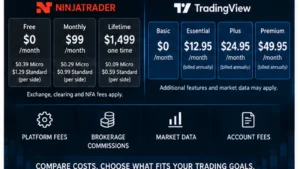
NinjaTrader’s U.S. pricing currently lists three brokerage plans. The Free plan has a $0 monthly plan fee with commissions of $0.39 per Micro and $1.29 per Standard futures contract per side. The Monthly plan is $99 per month with $0.29 Micro and $0.99 Standard commissions per side. The Lifetime plan is $1,499 one time with $0.09 Micro and $0.59 Standard commissions per side. Exchange, clearing, and NFA fees apply in addition to the listed commissions.
Other costs can include market-data subscriptions, certain third-party technology integrations, wire withdrawals, and account-related fees. NinjaTrader’s account-fee page currently lists CME non-professional top-of-book and full-depth data pricing separately and a $35 minimum account activity fee for qualifying Free-plan accounts that log in but do not place a live trade during the stated period. Always check the official fee schedule because these terms can change.
TradingView pricing
TradingView offers a free Basic tier and paid Essential, Plus, Premium, and Ultimate tiers. The official pricing page currently shows Essential at $12.95 per month when billed annually, while other plan prices and promotions depend on billing selection and current offers. Exchange data can also be a separate cost. A paid TradingView subscription is therefore not the same thing as a brokerage commission plan.
| Cost layerNinjaTraderTradingView | ||
|---|---|---|
| Platform entry | Free brokerage plan with $0 monthly plan fee | Basic charting tier at $0 |
| Paid plan | $99 monthly or $1,499 Lifetime under current U.S. pricing | Multiple charting subscription tiers |
| Brokerage commissions | Yes, based on NinjaTrader plan and contract | Determined by the connected broker |
| Exchange data | May be billed according to selected entitlement | May be purchased or verified through supported broker data |
| Other costs | Clearing, NFA, technology, account, and transfer fees may apply | Broker costs plus optional TradingView subscription/data costs |
For NinjaTrader vs TradingView 2026, the cheapest setup depends on what you actually need. A trader who only wants basic charting may spend nothing on TradingView. A futures trader using NinjaTrader’s Free brokerage plan still pays commissions and applicable exchange/regulatory costs when trading live. A hybrid user can have both TradingView subscription costs and NinjaTrader brokerage costs.
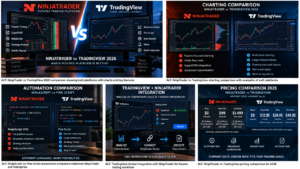
NinjaTrader vs TradingView 2026 on desktop, web, Mac, and mobile
NinjaTrader Desktop remains Windows-based. NinjaTrader’s current minimum requirements specify a 64-bit Windows environment for the downloadable desktop platform. However, NinjaTrader Web runs through a browser on PC or Mac, and NinjaTrader also offers iPhone and Android apps.
From a device-access perspective, NinjaTrader vs TradingView 2026 is closer than older comparisons suggest because both now offer browser-based workflows.
TradingView is naturally strong for cross-device chart access because its core workflow is web-based, with desktop and mobile applications also available. For Mac users, this means the comparison is more nuanced than it used to be: you can use NinjaTrader Web from a Mac browser even though the full NinjaTrader Desktop environment is a Windows product.
If you need NinjaScript, native desktop add-ons, or the deepest NinjaTrader customization, a Windows system remains the practical choice. If you mainly need charts, alerts, research, and broker-connected order entry from multiple operating systems, TradingView or NinjaTrader Web may be more convenient.
Who should choose NinjaTrader and who should choose TradingView?
The simplest NinjaTrader vs TradingView 2026 decision is to match the platform to the job you perform most often.
Choose NinjaTrader if you:
In NinjaTrader vs TradingView 2026, NinjaTrader fits best when futures execution and desktop depth are the priority.
- Trade futures as your primary market.
- Want a futures brokerage and platform ecosystem in one relationship.
- Use SuperDOM, advanced desktop order tools, Market Replay, or Strategy Analyzer.
- Want to build strategies or indicators with NinjaScript/C#.
- Need a large NinjaTrader-specific add-on ecosystem.
- Prefer a workstation-style Windows desktop setup.
Choose TradingView if you:
In NinjaTrader vs TradingView 2026, TradingView fits best when broad charting and browser access lead the workflow.
- Analyze multiple asset classes, not only futures.
- Prioritize browser-first charting and easy cross-device access.
- Use Pine Script, community indicators, alerts, and TradingView layouts.
- Want to compare many markets from one charting environment.
- Prefer chart-driven broker execution through supported integrations.
Use both if you:
A hybrid NinjaTrader vs TradingView 2026 setup can combine TradingView analysis with NinjaTrader brokerage access.
- Prefer TradingView’s charts but want NinjaTrader as the connected futures broker.
- Use TradingView for research and NinjaTrader Desktop for specialized execution or automation.
- Want flexibility to move between browser-based analysis and a deeper Windows futures workstation.
For many users, the best answer to NinjaTrader vs TradingView 2026 is therefore a hybrid workflow rather than a forced platform switch.
NinjaTrader vs TradingView 2026 pros and cons
NinjaTrader pros
- Futures-focused brokerage and execution environment.
- Deep Windows desktop customization.
- SuperDOM, Strategy Analyzer, Market Replay, and NinjaScript ecosystem.
- Free simulation and charting resources are available.
- Can connect directly to TradingView.
NinjaTrader cons
- Full desktop experience is Windows-based.
- Learning curve can be higher for advanced tools.
- Live trading has commissions, exchange fees, data costs, and possible account fees.
- Advanced automation still requires testing, supervision, and technical skill.
TradingView pros
- Strong browser-first multi-market charting.
- Large indicator and Pine Script ecosystem.
- Cross-device workflow and simple sharing of layouts.
- Integrated broker panel, including NinjaTrader for futures.
- Free Basic tier for entry-level charting.
TradingView cons
- Brokerage terms and commissions come from the connected broker, not TradingView.
- Paid charting plans and exchange data can add cost.
- Broker integration does not reproduce every NinjaTrader Desktop feature.
- A Pine backtest should not be treated as proof of live execution performance.
Frequently asked questions
Is NinjaTrader better than TradingView for futures?
NinjaTrader vs TradingView 2026 has no universal winner because execution depth and charting breadth solve different problems.
NinjaTrader is generally the stronger fit for traders who prioritize native futures execution, SuperDOM, desktop automation, Strategy Analyzer, and NinjaScript. TradingView is generally the stronger fit for browser-based multi-market charting, Pine Script, alerts, and broad visual analysis. Because NinjaTrader is integrated with TradingView, many futures traders can use both.
Can I connect NinjaTrader to TradingView?
Yes. TradingView currently lists NinjaTrader as an integrated futures broker. You can select NinjaTrader from the Trading Panel, log in with an eligible account, and use supported order functions from TradingView. Available products, data, and order capabilities depend on account eligibility and current integration terms.
Can I use NinjaTrader on a Mac?
NinjaTrader Web can be accessed from a Mac browser, but the downloadable NinjaTrader Desktop platform is designed for Windows. Mac users who need the full desktop NinjaScript and add-on environment would need an appropriate Windows setup.
Which is better for automated trading, NinjaTrader or TradingView?
For automation, NinjaTrader vs TradingView 2026 depends on whether you need NinjaScript/C# depth or Pine Script chart logic.
It depends on the automation architecture. NinjaTrader uses NinjaScript/C# and provides desktop strategy tooling, while TradingView uses Pine Script for chart-based indicators and strategies. A TradingView strategy or alert should not be assumed to route live broker orders automatically without a supported execution workflow.
Does TradingView replace NinjaTrader market data?
Not necessarily. Data entitlements depend on the exchange, broker, and TradingView account. TradingView documents real-time data verification for NinjaTrader connections across several futures exchanges. Check whether an existing broker data entitlement can be verified before purchasing duplicate data.
Which platform is cheaper?
The cost side of NinjaTrader vs TradingView 2026 depends on subscriptions, brokerage commissions, market data, and account fees.
There is no single answer because the cost layers differ. TradingView has a free Basic tier and optional paid subscriptions. NinjaTrader has a $0 monthly Free brokerage plan plus commissions and applicable trading fees. Live futures trading can also involve exchange, clearing, regulatory, data, and account charges.
Can I use TradingView charts and execute through NinjaTrader?
Yes, where the NinjaTrader broker integration and your account support the instrument and order type. This hybrid workflow is one of the strongest reasons the NinjaTrader vs TradingView 2026 decision is no longer purely either-or.
Final verdict: NinjaTrader vs TradingView 2026
NinjaTrader vs TradingView 2026 comes down to the layer of the trading workflow you care about most. NinjaTrader is the more complete futures-specific environment when brokerage execution, SuperDOM, desktop customization, NinjaScript, strategy testing, and specialized futures tools are central to your process. TradingView is the more flexible charting environment when browser access, multi-market research, Pine Script, alerts, and a broad indicator ecosystem are the priority.
The integration between the two platforms makes the most practical answer more interesting: you can use TradingView for analysis and a connected NinjaTrader account for eligible futures execution, while retaining NinjaTrader Desktop for functions that TradingView does not reproduce. That combination may be more useful than choosing a single winner.
The safest way to approach NinjaTrader vs TradingView 2026 is to choose the workflow first and validate it before risking capital.
No platform choice removes futures risk. Test workflows in simulation, verify order behavior, understand data and fee requirements, and do not treat a backtest or platform feature as evidence of future returns.
Compare both platforms before choosing your workflow
Affiliate links. Verify current pricing, eligibility, market-data terms, and product conditions directly with each provider.
Official sources checked
Editorial scope: This comparison is based on publicly available provider documentation checked September 9, 2026. We did not independently benchmark execution speed, live slippage, or strategy profitability. Product features, fees, data access, and integration terms can change.
Affiliate disclosure: TradeboticsAI may receive compensation from qualifying NinjaTrader referrals and TradingView purchases made through marked affiliate links. No payment is offered to readers for registering, purchasing, or trading.
Risk disclosure: Futures are leveraged products and involve substantial risk, including losses that can exceed the initial investment. Simulated and historical results are hypothetical and do not predict live performance. This material is educational and is not personalized financial advice or a recommendation to trade.