Updated: September 7, 2026


Quick Answer: Is NinjaTrader SuperDOM Worth Using?
NinjaTrader SuperDOM is a depth-of-market and order-entry
interface designed primarily for active futures traders. It combines a
real-time price ladder, bid and ask depth, order placement, position
management and integration with NinjaTrader ATM Strategies in a single
workspace.
For discretionary futures traders who value fast execution and want to see
resting liquidity around the current market, NinjaTrader SuperDOM
can be one of the platform’s most useful tools. Traders can place, modify and
cancel orders directly from the ladder instead of relying exclusively on
traditional chart-based order entry.

It is not automatically better than Chart Trader for every user. Traders who
prefer visual technical analysis may still favor chart-based execution,
while scalpers and short-term futures traders may appreciate the direct,
price-centered workflow of a DOM.
What Is NinjaTrader SuperDOM?
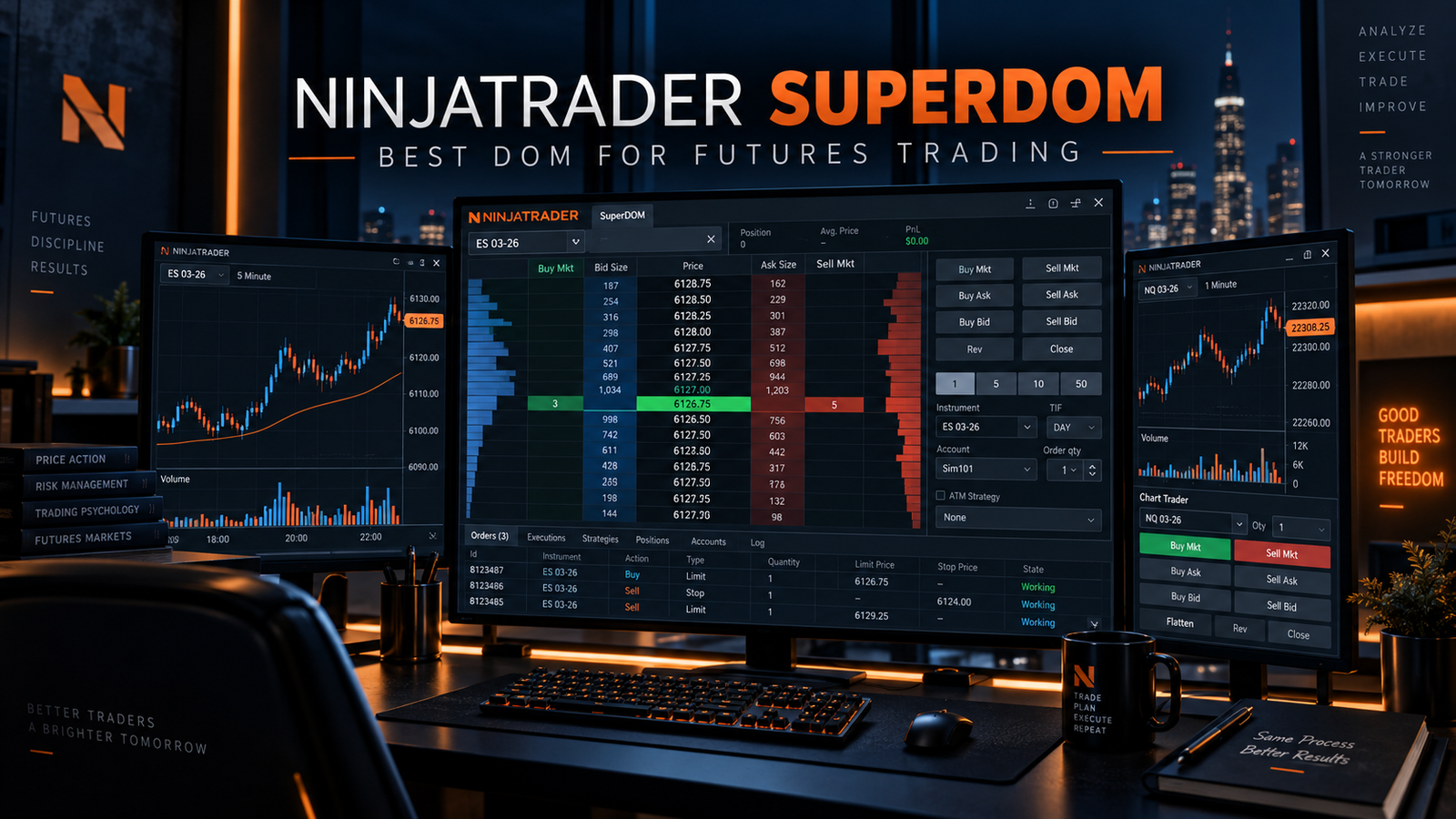
NinjaTrader SuperDOM stands for Super Depth of Market. It is
a ladder-style futures trading interface that organizes prices vertically and
displays available bid and ask liquidity around the current market.
The purpose of the DOM is different from a traditional chart. A candlestick
chart emphasizes historical price movement, while the SuperDOM emphasizes
current prices, orders and market depth. This can make it particularly useful
for traders who need to act quickly around specific price levels.
NinjaTrader’s official documentation describes the SuperDOM as an interface
for managing orders, positions, discretionary exits and stop strategies in a
highly visual environment.

For active futures traders, NinjaTrader SuperDOM can
therefore function as both an information display and an execution panel.
You can verify the platform’s current functionality in the
official NinjaTrader SuperDOM documentation.
How NinjaTrader SuperDOM Works
At the center of NinjaTrader SuperDOM is the price ladder.
Each row represents a price level, while surrounding columns can display bid
size, ask size, working orders, positions and other information.
As the market moves, traders can see how quoted liquidity changes across
different prices. Orders can then be submitted directly at the desired level
rather than manually typing every price into a separate ticket.
This structure is particularly useful in futures because many short-term
strategies are based around precise entry, stop and target prices.
The SuperDOM is also designed to work with NinjaTrader’s broader execution
environment, including ATM Strategies. This means a trader can combine
manual entry decisions with predefined stop-loss and profit-target logic.

NinjaTrader SuperDOM Price Ladder and Market Depth
The price ladder is the defining feature of
NinjaTrader SuperDOM. Instead of displaying price
horizontally across time, the DOM stacks available prices vertically.
Bid and ask depth can show the quantity of contracts currently displayed at
different levels. This can help traders understand where visible liquidity is
concentrated.

For example, a trader may see significantly more contracts resting at one
price than at neighboring levels. That information may provide additional
context about potential liquidity, but it should never be interpreted as a
guaranteed support or resistance level.
Resting orders can be changed or canceled. Therefore,
NinjaTrader SuperDOM is most useful when market depth is
combined with executed trades, price behavior and a defined trading plan.
NinjaTrader SuperDOM Order Entry and Management
One of the biggest reasons traders use
NinjaTrader SuperDOM is execution speed. Orders can be
submitted directly through the ladder at specific prices.
The platform supports common futures order-management tasks such as entering
orders, modifying working orders, canceling orders and managing an existing
position.
Orders are also represented visually on the price ladder, allowing the
trader to see where entries, stops and targets are positioned relative to
the current market.
This can be more efficient than repeatedly opening a separate order ticket,
particularly in fast-moving intraday markets.

NinjaTrader documentation also provides controls for closing an open
position or reversing a position. Because these actions can affect live
capital immediately, traders should become familiar with the interface in
simulation before relying on it during live execution.
NinjaTrader SuperDOM and ATM Strategies
ATM stands for Advanced Trade Management. ATM integration is one of the
stronger features of NinjaTrader SuperDOM because it allows
a trader to combine discretionary entries with predefined position-management
rules.
An ATM template can define stop-loss and profit-target orders that are
submitted as part of a trade-management plan. Depending on the chosen
strategy, traders can also use features such as trailing stops, breakeven
logic and multi-target position management.
This does not mean the trading strategy itself becomes profitable or
automatic. The ATM system manages orders according to predefined instructions;
it does not determine whether the original trade idea is valid.
For scalpers, this separation can be useful. The trader decides when and
where to enter, while the platform handles predefined protective and target
orders consistently.
Static vs Dynamic NinjaTrader SuperDOM
On NinjaTrader Desktop, users may encounter Static and Dynamic SuperDOM
configurations. Both are designed around ladder-style execution, but their
price-ladder behavior differs.
| Feature | Static SuperDOM | Dynamic SuperDOM |
|---|---|---|
| Price ladder behavior | Prices remain in fixed ladder locations | The ladder can recenter as the market moves |
| Primary purpose | Consistent fixed-price placement | Dynamic market-centered execution |
| Learning curve | Requires familiarity with fixed ladder behavior | Often intuitive for traders accustomed to moving markets |
| Best choice | Depends on trader preference and workflow | Depends on trader preference and workflow |
Neither interface is universally superior. The appropriate choice depends on
how the trader prefers to visualize price movement and interact with orders.
How to Use NinjaTrader SuperDOM Market Depth Correctly
Market depth is valuable, but it is also easy to misinterpret. A large
displayed order does not necessarily mean that price will reverse when it
reaches that level.
The order book represents resting liquidity. Those orders can be executed,
modified or canceled. Because of this,
NinjaTrader SuperDOM should not be treated as a tool that
predicts market direction.

A stronger approach is to combine DOM information with price response,
executed volume and broader market structure.
Traders who want even deeper transaction-level analysis can also read our
NinjaTrader Order Flow+ Review 2026.
Order Flow+ and SuperDOM solve related but different problems. Order Flow+
focuses heavily on analyzing market activity, while the SuperDOM is
particularly useful for execution and real-time depth monitoring.
NinjaTrader SuperDOM on Mobile
The SuperDOM concept is not limited to the desktop platform. NinjaTrader also
provides a SuperDOM experience through its mobile application.
According to NinjaTrader, mobile users can view a ladder-style representation
of bid and ask prices, monitor market depth and place or modify futures trades
from the app.
Mobile access can be useful when a trader needs to monitor an existing
position away from the desktop, although screen size naturally limits how
much information can be displayed simultaneously.
For intensive scalping and multi-window order-flow analysis, many traders may
still prefer a larger desktop workspace.
NinjaTrader SuperDOM Pricing and Market Data in 2026
NinjaTrader SuperDOM is part of NinjaTrader’s broader
trading platform environment. NinjaTrader currently offers Free, Monthly and
Lifetime brokerage plans.
| Plan | Plan Cost | Micro Commission | Standard Commission |
|---|---|---|---|
| Free | $0 monthly plan fee | $0.39 per side | $1.29 per side |
| Monthly | $99/month | $0.29 per side | $0.99 per side |
| Lifetime | $1,499 one-time | $0.09 per side | $0.59 per side |
These commission figures are platform pricing advertised by NinjaTrader as
of September 2026. Exchange, clearing and NFA fees may apply in addition to
the listed commissions.
Real-time market-depth functionality can also depend on the market-data
permissions associated with the user’s account and exchange subscriptions.
Traders should verify the exact depth package required for the futures
contracts they intend to trade.
Because pricing and exchange-data fees can change, confirm current costs on
the
official NinjaTrader pricing page
before funding or changing a plan.
NinjaTrader SuperDOM Pros and Cons
Pros
- Fast ladder-based futures order entry.
- Real-time bid and ask depth visibility.
- Direct order modification and cancellation.
- Strong ATM Strategy integration.
- Clear visualization of working orders.
- Designed specifically with active futures traders in mind.
- Available within the broader NinjaTrader ecosystem.
- Useful alongside Order Flow+ analysis.
Cons
- Can appear complex to new futures traders.
- Market depth can be misinterpreted.
- Displayed liquidity can be canceled before execution.
- Full depth data may require additional market-data permissions or fees.
- Fast order entry increases the importance of execution discipline.
- Chart-focused traders may prefer Chart Trader.
Who Is NinjaTrader SuperDOM Best For?
NinjaTrader SuperDOM is best suited to active futures
traders who care about execution speed, precise order placement and current
market depth.

Good Fit for:
- Futures day traders.
- Scalpers.
- Micro E-mini traders.
- Traders using ATM Strategies.
- Users who prefer ladder-based execution.
- Traders monitoring Level II or depth-of-market data.
- Users who want to manage orders without switching between multiple windows.
Probably Not Necessary for:
- Long-term investors.
- Traders who rarely use market depth.
- Users who prefer simple chart-only execution.
- Beginners who have not yet learned futures order types and risk management.
The key question is not whether the SuperDOM contains more information than
a chart. The question is whether the trader can use that information
consistently without introducing unnecessary complexity.
How to Start With NinjaTrader SuperDOM
The safest way to learn NinjaTrader SuperDOM is to begin in
a simulated trading environment.
First, become familiar with the price ladder and identify the bid, ask and
current market price. Next, practice submitting, moving and canceling orders.
Then learn how working stops and targets appear on the ladder.
Only after those actions become familiar should a trader begin experimenting
with ATM Strategy templates or more advanced position-management techniques.
Simulation cannot reproduce every aspect of live trading, but it can reduce
basic platform errors while learning the interface.
Explore NinjaTrader Futures Trading
Create a NinjaTrader account and explore the platform in simulation before
deciding whether the SuperDOM workflow fits your futures trading process.
Affiliate disclosure: TradeboticsAI may receive compensation if you complete
a qualifying action through this link, at no additional cost to you.
NinjaTrader SuperDOM FAQ
What Does NinjaTrader SuperDOM Mean?
NinjaTrader SuperDOM means Super Depth of Market. It is a
ladder-style interface designed to display prices, bid and ask depth,
working orders and position information while allowing traders to manage
futures orders.
Is NinjaTrader SuperDOM Free?
NinjaTrader provides platform access through its current trading plans,
including a Free plan. Live futures trading, commissions and certain
market-data subscriptions can still involve charges even when there is no
monthly plan fee.
Can You Place Trades Directly From SuperDOM?
Yes. The SuperDOM is designed for order entry and management. Traders can
submit, modify and cancel orders from the ladder while monitoring their
position.
Does SuperDOM Work With ATM Strategies?
Yes. NinjaTrader’s ATM Strategy functionality can be selected within the
SuperDOM workflow so predefined stops and profit targets can be associated
with entries.
Is NinjaTrader SuperDOM Good for Scalping?
The ladder-based interface can be useful for scalpers because it provides
precise price-level order entry and market-depth information. Whether it
improves a particular trading strategy depends on the trader’s process and
execution discipline.
Does SuperDOM Show Level II Data?
The DOM displays market depth using available bid and ask information.
The amount of depth available depends on the connected data source,
exchange and market-data permissions.
Is SuperDOM the Same as Order Flow+?
No. NinjaTrader SuperDOM focuses heavily on market depth and
order execution. Order Flow+ contains specialized analytical tools such as
Volumetric Bars, Cumulative Delta, Volume Profile, VWAP and Market Depth Map.
The two can complement each other.
Should Beginners Use NinjaTrader SuperDOM?
Beginners can learn the interface, but they should first understand futures
contracts, order types, leverage, margin and risk management. Practicing in
simulation is preferable before using rapid order-entry tools with live
capital.
Final Verdict: Is NinjaTrader SuperDOM Worth It in 2026?
For active futures traders, NinjaTrader SuperDOM remains one
of NinjaTrader’s most practical execution tools. It combines a price ladder,
market depth, direct order entry, visual position management and ATM Strategy
integration in a focused interface.
Its strongest use case is not predicting where the market will move. Its
value comes from giving traders a structured way to see prices and liquidity
while managing orders quickly.
Futures scalpers and intraday traders may benefit most from this workflow,
especially when they already understand market structure and order
management. Longer-term traders may find the additional depth information
less important.
Used alongside disciplined risk management and tools such as Order Flow+,
NinjaTrader SuperDOM can form a powerful execution component
of a professional futures trading workspace.