NinjaTrader Demo Account 2026: Free Trial & Simulator Guide
NinjaTrader Demo Account 2026 is a practical way to learn the NinjaTrader platform, practice futures order entry, test strategies and explore advanced charting before putting real capital at risk. In 2026, NinjaTrader offers free simulated trading with no time limit on the simulator itself, while new users can receive a 14-day trial of live streaming futures market data. The important distinction is that the simulator, live-data trial and funded brokerage account are not the same thing. This guide explains exactly what you get, what happens after the data trial ends, how Sim101 works and what to test before moving from simulation to live futures trading.
Quick Answer: Is NinjaTrader Demo Account 2026 Free?
Yes. NinjaTrader Demo Account 2026 can be used for simulated futures trading without a minimum deposit, and NinjaTrader currently includes a 14-day free trial of live streaming market data for new users. Simulated trading itself has no time limit. After the live-data trial expires, you can continue practicing with delayed data, subscribe to market data or use eligible live data through a funded account. Inside NinjaTrader Desktop, the default simulated account is called Sim101.
Open NinjaTrader and Try the Simulator
Affiliate Disclosure: TradeboticsAI may earn compensation when a qualifying action is completed through an affiliate link, at no extra cost to you. This does not affect our editorial analysis.
How NinjaTrader Demo Account 2026 Works
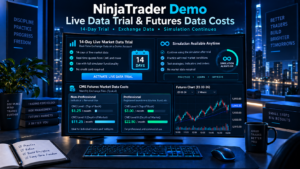
The search term NinjaTrader Demo Account 2026 is commonly used for NinjaTrader’s simulated trading experience, but it helps to separate three concepts. First, the NinjaTrader platform can be used for simulated trading. Second, new users can receive a limited trial of live streaming market data. Third, a live brokerage account is the environment used when real money is funded and live orders are enabled.
NinjaTrader’s official simulator page states that simulated trading has no time limit and that a free 14-day live-data trial is available. The simulator uses virtual money, so simulated gains and losses do not represent real account results. NinjaTrader also provides charting, market depth and strategy tools that can be used while practicing.
For current terms, review the official NinjaTrader trading simulator page. Trial terms, data access and platform entitlements can change, so the official page should take priority over older third-party tutorials.
NinjaTrader Demo Account 2026 Features
NinjaTrader Demo Account 2026 is useful because the practice environment is integrated with the same broader platform ecosystem used for futures analysis and execution. Depending on platform and entitlement, traders can work with charts, order-entry interfaces, market depth, technical indicators, Strategy Builder, NinjaScript strategies and simulation accounts.
| Feature | Simulation Use | Why It Matters |
|---|---|---|
| Virtual trading account | Yes | Practice without risking real capital |
| Advanced charts | Yes | Test layouts, indicators and market structure |
| Order entry | Yes | Learn market, limit, stop and bracket workflows |
| Strategy testing | Yes | Forward-test automated logic in simulation |
| Live streaming data | Trial / entitlement dependent | More realistic market observation |
| Real-money execution | No | Requires live trading access and funded capital |
A key advantage of the NinjaTrader simulator is that a trader can test platform mechanics before worrying about live execution. This is especially useful for learning ATM strategies, bracket orders, stop management, chart trading and automated strategy behavior.
What Is Sim101 in NinjaTrader Demo Account 2026?
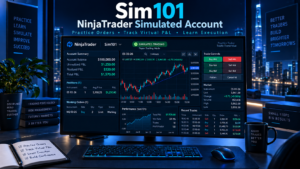
Inside NinjaTrader Desktop, the default simulated account is known as Sim101. When you place an order using Sim101, the platform simulates the trade rather than routing the order to a live brokerage account. The simulated account can track virtual cash, profit and loss, positions and margin-like behavior to help you practice the operational side of trading.
For simulator users, Sim101 is valuable because you can rehearse a complete workflow: select the correct contract, choose an order type, set quantity, place protective orders, monitor fills and close the position. That repetition is more useful than simply watching charts because it trains the mechanics that become important when markets move quickly.
Simulation is still an approximation. A simulated fill can differ from a real fill because live markets include queue position, available liquidity, slippage and network latency.
NinjaTrader Demo Account 2026 and the 14-Day Live Data Trial
NinjaTrader currently advertises a free 14-day trial of live streaming futures market data for new users. That makes the free simulator particularly useful during the first two weeks because the trader can observe real-time market movement while placing virtual trades.
Live data matters when practicing fast intraday markets because delayed prices can make order timing and short-term chart behavior less representative of the current session. The 14-day period is therefore best treated as a focused platform-learning window rather than wasted on passive observation.
Use the trial to configure charts, practice order entry, compare instruments, learn contract months and build a repeatable pre-trade checklist. If you use Strategy Builder or NinjaScript, the trial can also help you observe automated rules against current market data without committing real capital.
What Happens When the NinjaTrader Demo Account 2026 Live Data Trial Ends?
The expiration of the 14-day streaming-data trial does not mean the simulator itself disappears. NinjaTrader states that simulated trading has no time limit. After the trial, users can continue using simulation with the data access available to them, subscribe to suitable market data or use eligible real-time data through a funded account.
This distinction prevents a common misunderstanding about the NinjaTrader demo: the free live-data trial has a time limit, but the underlying practice capability is not advertised as a 14-day-only simulator.
NinjaTrader also provides a built-in Simulated Data Feed connection in Desktop. That connection generates market data locally for offline testing, but the official help guide warns that the generated market has no correlation to actual market data and provides no historical data. It can still be useful for testing software behavior or forcing strategy conditions.
How to Start NinjaTrader Demo Account 2026
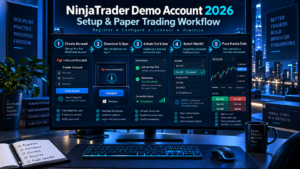
- Create your NinjaTrader account. Use accurate personal information and follow the current registration requirements.
- Access the platform. Choose Desktop, Web or Mobile where supported for your intended workflow.
- Confirm your market-data status. New-user trial data and funded-account entitlements are not the same.
- Select a simulated account. In Desktop, verify that Sim101 or another simulation account is selected before placing practice orders.
- Choose one futures market. Learning one liquid contract first is easier than switching constantly between markets.
- Practice your complete process. Include entry, protective stop, profit target, cancellation and emergency exit procedures.
Before every practice session, check the account selector. Accidentally routing an intended simulation order to a live account is an operational mistake that can be avoided by making account verification part of the routine.
What to Test in NinjaTrader Demo Account 2026 Before Going Live
The best use of the simulator is not to produce a huge virtual profit number. It is to prove that you can operate a defined process consistently. Test ordinary trades and failure scenarios.
- Entering and exiting with market, limit and stop orders.
- Placing stop-loss and target orders correctly.
- Changing or cancelling working orders.
- Handling partial fills and unexpected position sizes.
- Understanding tick value and contract quantity.
- Using daily loss and maximum position rules.
- Testing strategy behavior around market open and close.
- Checking what happens after connection interruptions.
- Verifying automated strategy start-up and shutdown behavior.
If automation is part of your plan, read our NinjaTrader API 2026 guide and NinjaTrader Strategy Builder guide. Indicators can also be tested systematically using our Best NinjaTrader Indicators 2026 guide.
NinjaTrader Demo Account 2026 vs Live Trading
| Factor | Simulation | Live Futures Trading |
|---|---|---|
| Capital at risk | Virtual | Real |
| Emotional pressure | Usually lower | Can be materially higher |
| Fills | Modeled | Dependent on real liquidity and execution |
| Slippage | May be simplified | Can vary significantly |
| Learning cost | No trading loss from practice orders | Mistakes can create real losses |
A profitable simulated track record does not prove that the same strategy will produce the same results live. Simulated performance lacks some of the execution constraints and psychological pressure of real-money trading. Treat simulation as a testing environment, not a promise of future returns.
NinjaTrader Demo Account 2026 Costs and Data Considerations
NinjaTrader Demo Account 2026 is free to use for simulated trading, but real-time exchange data can involve separate fees after the free trial depending on your status and subscription. NinjaTrader’s current U.S. fee schedule lists CME market-data charges for non-professional and professional users, with different prices for top-of-book and full-depth data.
As of September 2026, NinjaTrader lists non-professional CME Level I data at $12 per month for the four-exchange bundle or $4 per exchange, while Level II is $48 for the bundle or $16 per exchange. Professional rates are substantially higher. Always verify the current NinjaTrader account and exchange fees before subscribing because exchange fees can change.
This is why the NinjaTrader demo should be viewed as free practice plus a limited live-data trial, not as a guarantee of permanently free real-time exchange data.
NinjaTrader Demo Account 2026 Pros and Cons
| Pros | Cons |
|---|---|
|
|
Who Should Use NinjaTrader Demo Account 2026?
NinjaTrader Demo Account 2026 is especially useful for futures beginners, traders learning a new order-entry method, experienced users testing a new setup and developers validating automated strategies before live deployment. It also makes sense when moving to a new futures contract or changing a trading workflow.
Simulation is less useful when it becomes an endless substitute for disciplined live-readiness criteria. Set objective goals such as completing a fixed number of sessions without violating risk rules, demonstrating consistent order handling and documenting strategy behavior across different market conditions.
NinjaTrader Demo Account 2026 Risks and Limitations

The primary limitation of simulated trading is realism. Simulated orders do not expose your capital to the market and may not reproduce queue position, slippage, liquidity changes or the stress of a real loss. A strategy that looks stable in simulation can perform differently when real orders interact with actual market conditions.
The built-in Simulated Data Feed is even less representative of the real market because NinjaTrader states that it is internally generated, has no correlation to actual market data and does not provide historical data. Use it for platform or automation testing rather than market-performance conclusions.
Futures are leveraged products and can generate substantial losses. Never use a simulation result as a guarantee that a strategy is safe or profitable. Move to live trading only if you understand contract specifications, margin, tick value, order behavior and your maximum acceptable loss.
NinjaTrader Demo Account 2026 FAQ
Is NinjaTrader Demo Account 2026 completely free?
NinjaTrader Demo Account 2026 provides free simulated trading, and NinjaTrader currently offers a 14-day free trial of live streaming market data. After the live-data trial, continued real-time exchange data may require a subscription or eligible funded-account access.
How long does the NinjaTrader demo last?
The live streaming market-data trial is currently 14 days, but NinjaTrader states there is no time limit on simulated trading itself.
Do I need a minimum deposit to use the NinjaTrader simulator?
No minimum deposit is required to use the simulator. NinjaTrader notes that ACH and debit-card transfers have a $5 minimum when you later choose to fund an account.
What is Sim101?
Sim101 is the default simulated account in NinjaTrader Desktop. Orders sent to Sim101 are simulated rather than routed as real-money brokerage orders.
Can I use NinjaTrader Demo Account 2026 for automated strategies?
Yes. The NinjaTrader simulator can be used to test strategy behavior in simulation. NinjaTrader’s Simulated Data Feed documentation also specifically lists testing NinjaScript strategies and trade automation as use cases.
Does NinjaTrader simulation use real market data?
It can use streaming or delayed market data depending on your current data entitlement. The separate built-in Simulated Data Feed generates artificial data locally and is not correlated with actual market movement.
Can I reset a simulated account?
NinjaTrader Desktop provides simulation account management tools. The exact reset workflow can change with platform versions, so use the current platform help documentation before resetting account values or trade history.
Is simulated performance the same as live performance?
No. Live results can differ because of slippage, liquidity, queue position, latency, commissions, emotional pressure and other execution factors that simulation cannot reproduce perfectly.
Final Verdict: Is NinjaTrader Demo Account 2026 Worth Using?
The NinjaTrader simulator is one of the most useful starting points for evaluating NinjaTrader without immediately exposing real capital. The combination of free simulated trading, a 14-day live streaming data trial and access to NinjaTrader’s broader charting and strategy ecosystem gives both beginners and experienced traders a practical environment for learning and testing.
The strongest use case is process validation. Learn the platform, practice order types, test protective orders, configure charts, forward-test strategies and build a written risk routine. Do not judge success only by simulated profit.
Once you understand the difference between simulated data, live streaming data and live brokerage execution, the demo environment becomes a safer bridge between learning and real-money futures trading rather than a misleading promise of identical live results.
For more platform research, visit the TradeboticsAI homepage.