Futures Order Types 2026: Market, Limit, Stop & OCO Guide
Futures order types determine how an instruction to buy or sell a futures contract is handled, when it can become executable, and how much control a trader has over price versus execution certainty. In 2026, the core choices for active CME futures traders include market, limit, stop-market, stop-limit and market-if-touched orders, plus OCO relationships, bracket structures and time-in-force settings such as Day and GTC. Understanding these mechanics matters whether you trade ES, MES, NQ, MNQ, CL, GC or another futures contract.
This guide explains futures order types from the perspective of a retail trader using modern electronic markets. It also separates exchange behavior from what a front-end platform may call an order. That distinction is important because CME Globex uses protection logic for certain market and stop instructions, while brokers and platforms can expose simplified labels such as Market, Stop Market or Stop Limit.
Affiliate Disclosure: TradeboticsAI may receive compensation when readers complete qualifying actions through certain links. NinjaTrader buttons on this page are affiliate links. Compensation does not determine the educational conclusions in this guide.
Explore NinjaTrader for Futures Trading
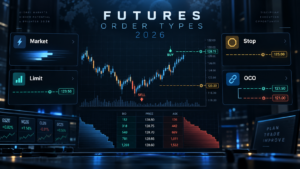
Futures Order Types 2026 Comparison
The table below summarizes the most common futures order types a retail trader will encounter. Comparing futures order types side by side makes the price-versus-execution trade-off easier to see. Exact availability depends on the exchange product, broker, FCM, trading platform and connection technology.
| Order / Function | Main Goal | Price Control | Execution Certainty | Primary Risk |
|---|---|---|---|---|
| Market | Execute quickly | Low | High in liquid markets, but not guaranteed at one exact price | Slippage |
| Limit | Control worst acceptable price | High | Not guaranteed | No fill or partial fill |
| Stop-Market | Trigger an order after price reaches a level | Limited after trigger | Generally prioritizes execution | Slippage after trigger |
| Stop-Limit | Trigger while retaining price control | High after trigger | Not guaranteed | Market trades through limit without filling |
| MIT | Enter after price touches a level on the opposite side of normal stop logic | Limited after trigger | Depends on market conditions | Slippage after activation |
| OCO | Link two orders so one can cancel the other | Depends on linked orders | Depends on linked orders | Incorrect linkage or race conditions |
| Bracket / ATM | Attach stop loss and profit target around a position | Configurable | Depends on component orders | Configuration and synchronization risk |
OCO and bracket structures are technically order-management relationships rather than simple price instructions, but they are essential to understanding how futures order types are used in real trading workflows.
How Futures Order Types Work on CME Globex
Futures order types are instructions that tell the exchange or trading infrastructure how an order should behave. The exchange determines which order types and qualifiers are supported for each product, while the broker and front-end platform determine which of those functions are exposed to the trader.
CME Globex supports a broad set of functionality across futures product lines, including Limit, Market with Protection, Market to Limit, Stop Limit and Stop with Protection orders. CME also notes that availability can vary by product and by how the customer accesses Globex. This is why a button labeled “Market” on a retail trading platform should not be interpreted as a promise that an unlimited market order can sweep any price on the book.
A modern futures order can pass through several layers: trading platform, broker or FCM controls, routing infrastructure and finally the exchange matching engine. Risk checks, permissions and technology rules can affect whether the order is accepted. For automated traders, the same process is exposed through the architecture covered in our Futures Trading APIs 2026 guide.
The key idea is that futures order types define behavior, but liquidity still determines the actual fill. Learning futures order types therefore requires understanding both instructions and market liquidity. No order type can create counterparties that are not available in the market.
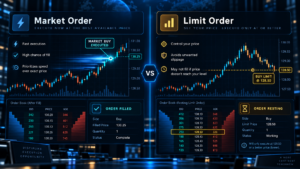
Market Orders: Fast Execution With Less Price Control
A market order tells the system that execution has priority over selecting one exact limit price. In a liquid contract such as an active ES or NQ month, the order may fill immediately against available resting liquidity. The fill can still occur across multiple price levels if the order is large relative to the quantity available near the best bid or ask.
Among futures order types, market orders are the easiest to understand conceptually but also the easiest to misuse during thin liquidity or sudden volatility. The price displayed on the screen before clicking does not guarantee the final average fill price.
CME Market With Protection
CME Group implements market orders on Globex using Market with Protection functionality for supported products. The exchange defines a protected range around the current market. The order attempts to execute within that range, and any quantity that cannot be filled within the protected range can rest as a limit order at the protection boundary.
This exchange behavior reduces the risk of an order executing at an extreme price far outside the current market, but it does not eliminate ordinary slippage. Traders should therefore think of a market instruction as “prioritize execution within the exchange’s rules,” not “guarantee the price currently shown on the chart.”
When a Market Order Makes Sense
A market order can be appropriate when getting into or out of a position matters more than saving one tick, especially in a liquid contract and normal market conditions. It can also be used by a risk-control system that must flatten exposure immediately after a rule breach.
It can be a poor choice immediately around major economic releases, during illiquid overnight periods or in a contract month whose liquidity has already migrated. Check our Futures Rollover Dates 2026 guide when trading quarterly equity-index futures near expiration.
Limit Orders: Price Control Without a Fill Guarantee
A limit order defines the worst price a trader is willing to accept. A buy limit can execute at the limit price or lower, while a sell limit can execute at the limit price or higher. This makes limits one of the most useful futures order types when price discipline matters.
The trade-off is execution uncertainty. If the market never reaches the limit, the order does not fill. Even if the market touches the limit price, queue position and available quantity can mean the trader receives only a partial fill or no fill before price moves away.
Passive vs Marketable Limits
A limit order does not have to rest passively away from the market. A buy limit entered above the current best ask can be immediately marketable and execute against available sell orders up to the limit price. Likewise, a sell limit below the current bid can execute against bids down to its limit.
This is useful because it allows a trader or algorithm to cap the worst acceptable execution price while still seeking an immediate fill. However, the cap also creates a risk that the remaining quantity is left unfilled if the market moves beyond the limit.
Limit Orders and Queue Position
For a resting limit order, getting the price right does not guarantee getting the trade. Futures markets generally match according to the exchange’s applicable matching algorithm. The number of contracts already resting ahead of your order can matter materially.
Order-flow traders should therefore combine an understanding of futures order types with the market-data depth explained in our Futures Data Feeds 2026 guide.
Stop-Market Orders: Trigger First, Then Seek Execution
A stop-market order waits until a specified trigger condition is reached. For a typical protective sell stop below the current market, the order activates if the market trades at or through the stop trigger according to the applicable rules. A buy stop is generally positioned above the current market.
Once activated, the stop-market instruction prioritizes getting the trader out or into the market rather than guaranteeing an exact exit price. This is why stop-market orders are frequently used for risk exits.
Among futures order types, a stop-market order can be safer than a stop-limit when the primary objective is to exit a losing position, because the stop-limit can remain unfilled after a rapid move. However, stop-market orders can experience significant slippage during gaps or fast conditions.
CME Stop With Protection
On CME Globex, supported stop instructions use Stop with Protection functionality. After the stop price is triggered, the order is executable only within an exchange-defined protected range. Unfilled quantity can remain at the protection limit rather than following the market indefinitely.
This protection mechanism is important because the phrase “stop market” on a trading interface can simplify more detailed exchange behavior. Traders should confirm how their broker and platform translate the order into native exchange instructions.
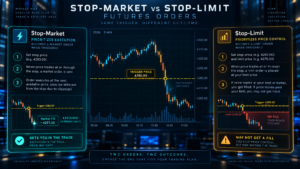
Stop-Limit Orders: Trigger Plus a Price Boundary
A stop-limit order combines a trigger price with a limit price. When the stop is triggered, the order becomes eligible to execute as a limit order at the specified limit price or better. This makes it one of the most controlled futures order types, but that control comes with a meaningful non-fill risk.
Consider a trader long ES who wants to exit if price falls through a specific level. A stop-market order focuses on getting out after the trigger. A stop-limit order can refuse execution beyond the trader’s limit. If the market moves rapidly through that limit without sufficient liquidity, the position can remain open even though the stop condition was reached.
When Stop-Limit Can Make Sense
Stop-limit orders may be useful for entries where the trader does not want to chase a breakout beyond a defined price. They can also be appropriate in strategies where price control is more important than immediate execution.
They require extra caution as protective exits. A risk-management rule that assumes “the stop was touched, therefore the position is flat” can fail if the stop-limit order is triggered but not filled.
Market If Touched Orders
Market If Touched, or MIT, is another order type supported by some futures platforms. NinjaTrader describes MIT as similar to a stop order with the buy and sell placement logic reversed. A buy MIT is generally placed below the current market, while a sell MIT is generally placed above it.
MIT can be useful for traders who want to enter when price retraces to a level and then execute using market-style logic once the level is touched. Among futures order types, MIT is especially useful to understand because its trigger placement can be confused with a stop order. It differs from a buy limit because the activation and resulting execution behavior are different.
Not every broker, exchange product or platform exposes the same set of futures order types, so MIT availability should be confirmed before designing a strategy around it.
OCO and Bracket Orders in Futures Trading
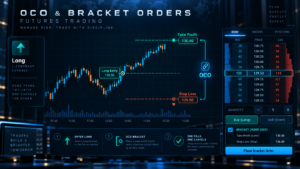
OCO means One Cancels Other. It links two orders so that when one is filled or canceled according to the implementation rules, the other order can be canceled. OCO is commonly used to pair a profit target with a protective stop loss.
For example, after a long futures entry, a trader might place a sell limit target above the market and a sell stop below the market. If the target fills first, the stop should be canceled. If the stop fills first, the target should be canceled. This prevents both exits from remaining independently active after the position has already been closed.
NinjaTrader’s Basic Entry documentation states that profit target and stop loss orders generated through an ATM Strategy are submitted as OCO. Traders can also manually create OCO relationships for entry or exit orders.
Bracket Orders
A bracket typically combines an entry with protective exits. Depending on the platform, the stop and target may be submitted when the entry fills or may be managed using server-side, broker-side or local logic. The location of this logic matters if the platform or internet connection fails.
OCO is not a magic guarantee. Race conditions can occur in very fast markets, and behavior can vary depending on whether the orders are exchange-native, broker-managed or platform-managed. Automated traders should log every state transition rather than assuming the OCO relationship always behaves exactly as expected.
This operational distinction is one reason futures order types should be tested in simulation before live use. Platform users who rely heavily on attached orders should also understand the broader workflow around DOM and automated execution.
Day, GTC and Other Time-in-Force Settings
Price behavior is only one dimension of futures order types. Time in force determines how long an eligible order remains active. In practice, futures order types and time-in-force rules should be configured together.
Day
A Day order is intended to remain active for the relevant trading day or session under the broker and exchange rules. CME education material notes that futures orders are commonly submitted as Day orders when no longer duration is requested.
GTC
Good Till Canceled, or GTC, is designed to remain active until it is filled or canceled, subject to broker, exchange and contract-expiration rules. GTC is useful for longer-lived orders but can create operational risk if traders forget that an old order is still working.
GTD, IOC and Other Qualifiers
Some platforms and APIs expose additional time-in-force values. NinjaTrader’s current order-creation interface includes Day, GTC, GTD, IOC and OPG values. Actual support depends on the connection and product. A strategy should never assume every value exposed in code is valid for every account and instrument.
For automated systems, stale working orders are a major risk. The application should reconcile open orders after reconnecting and should understand whether a contract rollover or session transition changes the intended order lifecycle.
Choosing Futures Order Types for Entries and Exits
The best entry order and the best exit order do not have to be the same. A strategy can use a resting limit to enter, a limit target to take profit and a stop-market to protect the downside.
Pullback Entry
A limit order can make sense when the trader wants to buy below the current market or sell above it and is comfortable missing the trade if price never returns.
Breakout Entry
A stop-market or stop-limit can be used above resistance for a long breakout or below support for a short breakout. The stop-market emphasizes participation; the stop-limit emphasizes a maximum acceptable execution price.
Profit Target
A limit order is the common choice because the trader wants to sell at or above a target price or buy back a short at or below a target price.
Protective Stop
A stop-market-style exit is often preferred when reducing risk is more important than controlling the exact fill price. A stop-limit may fail to exit during a fast move.
Good use of futures order types starts by identifying the purpose of each instruction rather than selecting one order type for every situation.
Slippage, Partial Fills and Execution Risk
Every discussion of futures order types should include execution risk. Slippage is the difference between the price a trader expected and the actual execution price. It can result from market movement, spread, order size and available liquidity.
Market and stop-market orders are more exposed to slippage because they prioritize execution. Limit and stop-limit orders control the worst acceptable price but can fail to fill completely.
Partial fills occur when only part of an order finds available counterparties. A ten-contract limit order can fill three contracts while seven remain working. Automated systems must track filled quantity rather than assuming an order is either fully filled or completely unfilled.
Commission and exchange fees also apply per execution according to the broker’s pricing. Use our Futures Commission Calculator 2026 to model explicit costs, and our Futures Tick Value Calculator 2026 to translate price movement into contract-level dollar exposure.
Futures Order Types and the DOM
A Depth of Market ladder can make futures order types easier to understand because the trader can see bids, asks, resting depth and working orders around the current price. Limit orders normally rest on the book when they are not immediately marketable, while stop orders are handled according to exchange and platform logic until their triggers are reached.
DOM traders should know that displayed liquidity can change rapidly. A large quantity visible one moment can be canceled before the market reaches it. Therefore, order placement should not rely on the assumption that every displayed bid or offer will still be present when the order arrives.
For platform comparisons, see Best DOM Trading Platforms 2026 and Best Order Flow Trading Platforms 2026.
Futures Order Types for Automated Trading
Automation makes correct order handling more important because software can submit instructions faster than a human can react. Automated futures order types must be mapped explicitly to the broker or API behavior expected by the strategy. The strategy must know the exact order state: submitted, accepted, working, partially filled, filled, canceled or rejected.
NinjaTrader’s NinjaScript order model supports Market, Limit, MIT, StopMarket and StopLimit values. Its unmanaged order interface also accepts OCO identifiers so developers can link related orders. The documentation warns that OCO strings should be unique rather than reused across groups.
When futures order types are controlled through an API, the application must also handle network failures, duplicate submissions, stale acknowledgements and reconnects. Never assume that a timeout means the exchange did not receive the order.
A robust system should query or reconcile live order state after any connection failure before sending replacements. Otherwise, a strategy can accidentally double its position because the original order was accepted even though the application did not receive the acknowledgement.
See our Futures Trading APIs 2026 guide and Best Automated Futures Trading Software 2026 for the broader infrastructure used to automate these workflows.
Common Futures Order Types Mistakes
Using Market Orders in Thin Liquidity
A market-style instruction can fill across several levels when little size is available. The resulting average price may be worse than expected.
Assuming a Limit Order Must Fill Because Price Touched It
Queue position and available opposing quantity matter. A touch on the chart does not guarantee that every resting order at that price was executed.
Using Stop-Limit as a Guaranteed Protective Exit
A stop-limit can trigger and remain unfilled. If the objective is to reduce risk immediately, that behavior may be unacceptable.
Forgetting Working GTC Orders
Long-lived orders can remain active after the trader has forgotten the original setup. Review working orders regularly.
Confusing OCO With a Single Order Type
OCO is a relationship between orders. The linked components can themselves be limits, stops or other supported instructions.
Ignoring Contract Rollover
A working order in the expiring contract does not automatically become an order in the new contract month. Validate symbols around rollover dates.
Assuming Simulation Equals Live Execution
Simulation cannot perfectly reproduce queue position, latency, slippage, partial fills or market impact. Test logic in simulation, but treat live execution as a separate environment.
Avoiding these mistakes is more valuable than memorizing every possible futures order types label available in a platform menu.
Best Futures Order Types by Use Case
| Use Case | Typical Choice | Why | Main Caveat |
|---|---|---|---|
| Immediate liquid-market entry | Market | Prioritizes execution | Slippage |
| Pullback entry | Limit | Defines acceptable price | Trade may never fill |
| Breakout entry | Stop-Market or Stop-Limit | Activates after trigger | Slippage or non-fill |
| Profit target | Limit | Controls target execution price | Partial or no fill |
| Protective exit | Stop-Market | Prioritizes reducing exposure | Price not guaranteed |
| Retracement trigger | MIT | Activates market-style order after touch | Support varies |
| Target plus stop | OCO / Bracket | Coordinates linked exits | Implementation and synchronization matter |
This table is a framework, not a recommendation to use any specific futures order types for a live trade. Strategy, liquidity and risk requirements determine the appropriate instruction.
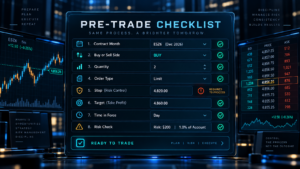
Futures Order Types Pre-Trade Checklist
Before submitting an order, confirm the instrument and exact contract month. ESZ26 and ESH27 are separate contracts, and working orders do not migrate automatically between them.
Confirm buy or sell direction, quantity and whether the order is intended to open, reduce or close a position. Use our Futures Position Size Calculator 2026 when defining size from account risk.
Check whether price control or execution certainty has priority. That decision usually narrows the choice among futures order types immediately.
Verify stop and limit prices before submitting a stop-limit order. Confirm time in force, especially if the order should not survive beyond the current session.
If using OCO or a bracket, confirm that the stop and target belong to the intended position and account. Multi-account traders should verify every follower separately.
Finally, know what happens if the platform disconnects. Determine whether the working order resides at the exchange, broker infrastructure or locally in the platform. The answer can change the real-world reliability of the risk plan.
Futures Order Types FAQ
What are the main futures order types?
The most common futures order types for retail traders are market, limit, stop-market and stop-limit. Platforms can also support MIT orders, OCO relationships, bracket orders and additional exchange-specific functionality.
What is the difference between a market and limit order?
A market order prioritizes execution and does not promise one exact fill price. A limit order specifies the worst acceptable price but is not guaranteed to execute.
What is the difference between stop-market and stop-limit?
A stop-market activates after its trigger and prioritizes execution. A stop-limit activates into a limit-style instruction and will not execute outside its permitted price, which means it can remain unfilled.
Does CME use normal market orders?
CME Globex implements supported market instructions using Market with Protection functionality. The protected range is designed to limit extreme execution prices, and unfilled quantity can rest at the protection boundary.
Can a limit order fill better than my limit price?
Yes. A buy limit can execute at its limit or lower, and a sell limit can execute at its limit or higher, depending on available liquidity.
Why did price touch my limit without filling me?
Other orders may have been ahead of yours in the queue, and there may not have been enough opposing quantity to reach your order before price moved away.
What is an OCO order in futures?
OCO means One Cancels Other. It links two orders so that execution or cancellation of one can cancel the other according to the platform and routing implementation. It is commonly used for a target and protective stop.
What is a bracket order?
A bracket typically surrounds a position with a profit target and protective stop, often linked through OCO logic. Exact behavior depends on the platform, broker and connection.
What is a Market If Touched order?
MIT activates a market-style order when price touches a specified level. In NinjaTrader’s educational documentation, a buy MIT is generally placed below the current market and a sell MIT above it, opposite the usual placement of stop entries.
What does GTC mean?
GTC means Good Till Canceled. The order is designed to remain active until filled or canceled, subject to broker, exchange and contract rules.
Which order type is best for a stop loss?
There is no universal answer, but a stop-market-style exit prioritizes getting out after the trigger, while a stop-limit prioritizes price control and can fail to fill. The choice depends on the risk objective.
Are futures order types the same at every broker?
No. Exchange support, front-end platform features, broker configuration and connection technology can differ. Always verify the exact order type supported for the contract and account you trade.
Can automated systems use OCO orders?
Yes, when supported by the platform or API. Automated systems should use unique identifiers where required and reconcile order states after disconnects or partial fills.
Does a stop order guarantee my exit price?
No. A stop trigger determines when the order becomes executable; it does not guarantee the final fill price. Fast markets can create slippage.
Should beginners use complex order types?
Beginners should first understand market, limit, stop and stop-limit behavior before adding complex automation. Simulated trading is useful for learning mechanics, but simulated fills are not identical to live execution.
Final Verdict: Futures Order Types for 2026
The most important futures order types are still the fundamentals: market, limit, stop-market and stop-limit. Market-style orders emphasize execution, while limit-style orders emphasize price control. Stop orders add a trigger, and OCO or bracket logic coordinates multiple working instructions around a position.
CME Globex adds an important detail: supported market and stop instructions can use exchange protection functionality rather than behave like unlimited orders. That reduces extreme-price exposure but does not eliminate slippage, partial fills or execution risk.
For most traders, the best approach is to match the order to the job. Use limit logic when missing the trade is acceptable but paying beyond a defined price is not. Use market-style logic when execution matters more than one exact price. Treat stop-limit orders carefully as protective exits because they can remain unfilled.
Finally, test futures order types in the exact platform, broker and connection you plan to use. Confirm time in force, OCO behavior, partial-fill handling, disconnect recovery and contract rollover. Correct order mechanics are part of risk management, not merely a platform setting. Well-chosen futures order types should support the risk plan rather than replace it.
Explore NinjaTrader for Futures Trading
Official Sources
Affiliate Disclosure: TradeboticsAI may receive compensation when readers complete qualifying actions through affiliate links. Affiliate relationships do not determine the educational conclusions on this page.
Risk Disclosure: Futures trading involves substantial risk of loss and is not suitable for every investor. Leverage can magnify losses. Stop orders do not guarantee an exact execution price, and limit orders may not fill. Automated order logic can fail because of software, connectivity, synchronization or configuration errors.
Order Handling Disclaimer: Order types, qualifiers, protection ranges, routing behavior and platform support can change and can vary by product, broker and connection. Verify the exact behavior with CME Group, your broker or FCM and your trading platform before placing live orders.
Last reviewed: September 10, 2026.