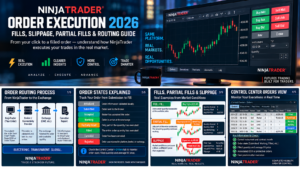
NinjaTrader Order Execution 2026: Fills, Slippage, Partial Fills & Routing Guide
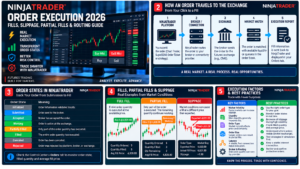
NinjaTrader Order Execution is the process that begins when you submit a futures order and ends when the order is accepted, working, partially filled, fully filled, canceled, or rejected. In 2026, NinjaTrader explains that an order travels from the platform through the broker or connectivity provider to the exchange, where it is matched against available liquidity. Execution quality depends on order type, market conditions, liquidity, order size, and connection quality. Understanding fills, slippage, partial fills, and order states is essential before moving from simulation to live futures trading.
Quick Answer: NinjaTrader Order Execution is not simply the moment you click Buy or Sell. A live order is submitted, accepted by the broker, acknowledged by the exchange, placed into the market, and then filled against available orders. Market orders prioritize execution but can slip, Limit orders prioritize price but may not fill, and larger orders can receive partial fills across one or more prices. The Control Center Orders tab shows order state, filled quantity, and average fill price so you can monitor the process.
Affiliate Disclosure: TradeboticsAI may receive compensation if you register or complete an eligible action through links on this page, at no additional cost to you. This does not affect our editorial analysis.
What Is NinjaTrader Order Execution?
NinjaTrader Order Execution describes what happens after an order is submitted from an order-entry interface such as SuperDOM, Chart Trader, Order Ticket, Basic Entry, or an automated strategy. The platform sends the instruction through the selected brokerage or connectivity infrastructure, and the exchange attempts to match it with available opposing orders.
A completed execution is called a fill. If only part of the requested quantity is matched, the order can become partially filled while the remaining quantity continues working. The final outcome is affected by the order type and the liquidity available at the time the order reaches the market.
This means the chart price visible when you click is not a guaranteed execution price for every order type. A market can move between the moment you see a quote and the moment the exchange matches the order.
For NinjaTrader’s current explanation of the order process, see the official NinjaTrader futures order execution guide.
How NinjaTrader Order Execution Travels to the Exchange
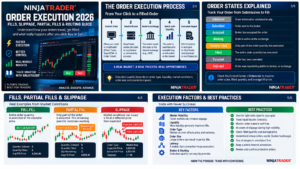
NinjaTrader describes the basic live-order path as platform to broker and then to exchange. At the exchange, the order is matched against another market participant according to the applicable order book and matching rules.
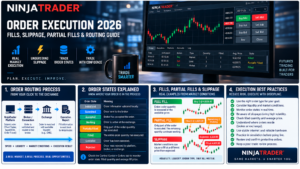
A simplified NinjaTrader Order Execution sequence looks like this:
- The trader selects the account, contract, quantity, order type, and price instructions.
- NinjaTrader validates the instruction locally.
- The order is submitted to the connectivity provider or broker.
- The broker accepts or rejects the order.
- An accepted order can be sent to the exchange.
- The exchange acknowledges the order as working when applicable.
- Available opposing liquidity determines whether the order remains working, partially fills, or fully fills.
- Execution reports return through the connection and update NinjaTrader.
The process is electronic and often very fast, but no platform can remove market liquidity, volatility, exchange rules, or network risk. The execution result is therefore a market outcome, not simply a software setting. NinjaTrader Order Execution should always be evaluated using the actual fill report rather than the quote visible before submission.
NinjaTrader Order Execution States Explained
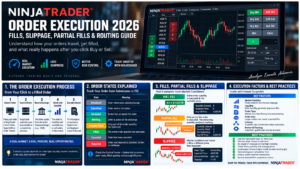
The Control Center uses order states to show where an order is in its life cycle. Understanding these states makes NinjaTrader Order Execution easier to troubleshoot because a submitted order is not the same as a working or filled order.
| Order State | Meaning | What the Trader Should Know |
|---|---|---|
| Initialized | Order information validated locally | The order has not completed the live routing path yet. |
| Submitted | Order submitted to the connectivity provider | Awaiting downstream confirmation. |
| Accepted | Broker confirmation received | The broker has accepted the order. |
| Working | Exchange confirmation received | The order is active and waiting for execution when applicable. |
| Partially Filled | Only part of the quantity has executed | The remaining quantity may continue working. |
| Filled | The entire order quantity has executed | Review average fill price and resulting position. |
| Rejected | Order rejected locally, by provider, broker, or exchange | Read the rejection reason before resubmitting. |
If an order is rejected, do not repeatedly submit the same instruction without understanding why. See our NinjaTrader Order Rejected 2026 guide for a dedicated troubleshooting workflow.
NinjaTrader Order Execution: Full Fills vs Partial Fills
A full fill means the entire order quantity has executed. A partial fill means only part of the quantity has matched and the remaining quantity is still unresolved. NinjaTrader explains that partial fills can occur when there is not enough liquidity at a price to complete the full order immediately.
For example, a trader submits a buy order for 10 contracts, but only four contracts are available at the relevant price. The first four may execute while the remaining six wait for additional sellers or execute at different prices depending on the order type and market movement.
Partial fills matter because they can change how NinjaTrader Order Execution develops after the first contracts are matched:
- average fill price can change as additional contracts execute;
- protective orders may need to reflect the quantity actually filled;
- larger order sizes can interact with multiple price levels;
- an automated strategy may respond differently depending on how partial fills are handled.
NinjaTrader’s managed strategy documentation provides different handling choices for protective orders around partial fills. Live discretionary traders should also watch filled quantity and average price rather than assuming a submitted quantity is already fully executed.
NinjaTrader Order Execution and Slippage
Slippage is the difference between the price a trader expected and the price actually received. It is one of the most important real-world variables in NinjaTrader Order Execution.
NinjaTrader states that slippage is more common in volatile markets, when liquidity is limited, and when market-style orders are used. A buy Market order may fill above the price visible when it was submitted, while a sell Market order may fill below the expected price.
Slippage is not always caused by poor platform performance. The order book can change rapidly, especially around economic releases, market opens, unexpected headlines, and thin overnight periods. If the best available contracts disappear before your order reaches them, execution moves to the next available price level.
Stop Market orders also carry slippage risk because once triggered they become Market orders. A stop price is therefore a trigger, not a guaranteed fill price.
Market vs Limit NinjaTrader Order Execution
The most important execution tradeoff is price certainty versus fill certainty. This is why Market and Limit orders behave differently even when they are submitted from the same NinjaTrader interface.
| Order Type | Primary Priority | Main Execution Risk |
|---|---|---|
| Market | Execute as quickly as possible at available prices | Slippage and uncertain final price |
| Limit | Do not execute worse than the specified limit | No-fill or partial-fill risk |
| Stop Market | Prioritize execution after trigger | Can fill away from the stop price |
| Stop Limit | Add price control after trigger | Can trigger but remain unfilled |
For a complete breakdown of Market, Limit, Stop Market, Stop Limit, MIT and OCO behavior, see our NinjaTrader Order Types 2026 guide.
Where NinjaTrader Orders Reside
Where an order physically resides can matter during a computer, platform, or internet interruption. NinjaTrader’s documentation explains that order location depends on the selected connection and whether the exchange or provider natively supports the order type.
For NinjaTrader connections, the help guide states that orders in Accepted, Working, or Suspended states are at the brokerage or exchange, while an unsupported order type can remain active on NinjaTrader servers. The same documentation notes that some OCO behavior can depend on the connection and may be simulated rather than exchange-native.
This makes one rule especially important: do not assume every order or OCO relationship is protected in exactly the same way during a local outage. Check the behavior of your specific account connection and order type before relying on unattended execution.
If a connection fails while a position is open, verify the actual brokerage position and working orders as soon as connectivity is restored. Do not rely only on what a chart looked like before the interruption.
Liquidity, Queue Position and Order Size
NinjaTrader Order Execution is strongly affected by the liquidity available in the futures order book. A highly liquid contract can typically absorb smaller orders more easily than a thin contract, but even liquid markets can change rapidly during volatile periods.
Limit orders also compete for available liquidity. Reaching your displayed limit price does not always guarantee that your full quantity will fill. Other orders may be ahead in the queue, available volume may be insufficient, or the market may trade at the level only briefly.
Larger orders increase the probability that execution will span several price levels when using market-style instructions. The average fill price shown by NinjaTrader therefore matters more than the first reported fill when quantity is executed across multiple prices.
Micro futures can help traders reduce contract size and dollar exposure, but the same execution principles still apply. Smaller position size does not eliminate spread, liquidity, queue, or slippage risk.
NinjaTrader Order Execution: Latency and Connection Risk
Latency is the time required for information and order messages to move through the trading infrastructure. A live NinjaTrader Order Execution depends on more than the speed of the desktop computer: the path includes internet connectivity, brokerage infrastructure, routing systems, and the exchange.
In normal liquid conditions, execution can be very fast. During volatile events, however, quotes can update multiple times while an order is traveling. This can increase slippage and make the visible price differ from the actual fill.
Practical ways to reduce operational execution risk include:
- using a stable wired or high-quality internet connection when possible;
- avoiding unnecessary background load on the trading computer;
- checking that the correct live account and connection are active;
- understanding what happens to working orders if connectivity is lost;
- avoiding maximum leverage during high-volatility events.
How to Monitor NinjaTrader Order Execution
The Control Center Orders tab is one of the most useful places to monitor live orders. For live NinjaTrader Order Execution, NinjaTrader displays the instrument, action, type, quantity, Limit or Stop price when applicable, current state, filled quantity, and average fill price.
After submitting an order, verify:
- the correct contract month;
- the correct account;
- the current order state;
- filled quantity versus requested quantity;
- average fill price;
- working stop and target orders;
- the resulting position quantity.
Do not assume an order is live just because you clicked Submit. A Rejected state means no valid working order exists. A Partially Filled state means the position can already exist even though the full requested quantity has not executed.
Common NinjaTrader Order Execution Problems
Order Is Accepted but Not Filled
An Accepted or Working order may simply be waiting for the market to reach the required price or for sufficient liquidity to become available. A working Limit order is not a guarantee of execution.
Order Is Partially Filled
Only part of the requested quantity has found matching liquidity. Review the remaining quantity and protective-order behavior before changing or canceling the order.
Fill Price Is Worse Than Expected
This is commonly associated with slippage on Market or triggered Market orders. Volatility, gaps, thin liquidity, and fast movement can widen the difference between expected and actual price.
Order Is Rejected
Possible causes include invalid prices, unsupported settings, insufficient margin, account restrictions, position limits, or connection-related rules. Read the rejection message and fix the underlying cause before resubmitting.
Order Appears Unknown After Reconnection
NinjaTrader documents that some locally simulated or non-native order types can behave differently during connection recovery. Verify positions and working orders directly rather than guessing from an old local state.
Time in Force can also affect whether an order remains active between sessions. See our NinjaTrader Time in Force 2026 guide for Day, GTC, and GTD behavior.
NinjaTrader Order Execution Checklist
Before and after submitting a live futures order, confirm:
- the correct live account is selected;
- the correct futures symbol and contract month are selected;
- quantity matches the intended risk;
- order type matches the execution objective;
- Limit and Stop prices are correct when applicable;
- Time in Force is correct;
- margin and buying power are sufficient;
- the order reaches Accepted or Working state as expected;
- filled quantity and average fill price are reviewed;
- protective orders match the actual filled position;
- no rejected or stale orders remain unnoticed;
- the final position is confirmed after execution.
Practice this workflow in simulation before using real capital. Our NinjaTrader Demo Account 2026 guide explains how to rehearse order entry without real-money exposure.
NinjaTrader Order Execution: Pros and Cons
Pros
- Exchange-listed futures use transparent market-based pricing and visible liquidity.
- NinjaTrader exposes detailed order states for monitoring the execution life cycle.
- The Orders tab displays filled quantity and average execution price.
- Multiple order types let traders choose between price control and execution priority.
- Simulation provides a way to practice execution workflows before trading live.
Cons
- Market and Stop Market orders can experience slippage.
- Limit orders can remain unfilled or partially filled.
- Execution quality can deteriorate during low liquidity or extreme volatility.
- Order location and OCO behavior can depend on connection technology.
- Network or platform interruptions can complicate live order management.
NinjaTrader Order Execution FAQ
How does NinjaTrader Order Execution work?
A live order is submitted from the platform through the broker or connectivity provider to the exchange, where it is matched against available opposing orders. The execution report then updates NinjaTrader with order state and fill information.
What is slippage in NinjaTrader?
Slippage is the difference between the price expected and the actual fill price. NinjaTrader notes that it is more common during volatility, low liquidity, and market-style execution.
What is a partial fill?
A partial fill occurs when only part of the submitted quantity is executed. The remaining quantity can continue working depending on the order type and order state.
What does Working mean in NinjaTrader?
NinjaTrader defines Working as confirmation that the order has been received by the exchange. It remains active until it fills, is changed, canceled, expires, or otherwise leaves the working state.
What does Accepted mean?
Accepted means NinjaTrader has received confirmation that the broker accepted the order. It is a different stage from Working, which represents exchange confirmation.
Why did my Market order fill at a different price?
Market orders execute against the best liquidity available when they reach the market. If prices move or available size changes during routing, the fill can differ from the price visible when the order was submitted.
Can a Limit order get partially filled?
Yes. If there is not enough available opposing quantity at the limit price, only part of the order can execute while the remainder stays working.
Does NinjaTrader guarantee order execution?
No. Execution depends on order type, market liquidity, broker and exchange acceptance, connectivity, and market conditions. No trading platform can guarantee a specific fill price or eliminate slippage.
Final Verdict: NinjaTrader Order Execution in 2026
NinjaTrader Order Execution is transparent enough to monitor in detail, but it still obeys the realities of an electronic futures market. A submitted order moves through multiple stages before becoming a completed fill, and order state, liquidity, order type, and market speed all influence the final result.
The most important distinction in NinjaTrader Order Execution is between execution certainty and price certainty. Market-style orders prioritize getting filled but can slip. Limit-style orders protect the acceptable price but can remain unfilled or partially filled. Larger orders, thin liquidity, and volatile conditions make these tradeoffs more important.
Before trading live, learn the order states, monitor filled quantity and average price, understand where your orders reside, and verify the resulting position after every execution. Simulation can teach the workflow, but live trading introduces real queue position, liquidity, latency, and financial risk.
Affiliate Disclosure: TradeboticsAI may earn compensation when eligible users take an action through certain links on this page. Our content remains editorially independent and is provided for educational and comparison purposes.
Risk Disclosure: Futures trading involves substantial risk of loss and is not suitable for every investor. Order execution is not guaranteed at the price visible when an order is submitted. Slippage, partial fills, gaps, latency, low liquidity, rejected orders, network interruptions, and exchange conditions can affect results. Simulated performance does not guarantee live execution quality. Verify current NinjaTrader order behavior and account rules before trading live.