NinjaTrader Order Types 2026: Market, Limit, Stop, MIT & OCO Guide
NinjaTrader Order Types give futures traders several ways to enter, exit, protect, and manage positions. In 2026, NinjaTrader Desktop supports core order types including Market, Limit, Stop Market, Stop Limit, and Market-if-Touched (MIT), while OCO logic can link related orders so that when one order is filled or canceled, the other orders in the same group are canceled. Choosing the correct order type matters because each method balances execution certainty, price control, and slippage differently.
Quick Answer: The main NinjaTrader Order Types are Market, Limit, Stop Market, Stop Limit, and MIT. Market orders prioritize execution, Limit orders prioritize price, Stop Market orders become market orders after a trigger, Stop Limit orders add a price limit after the stop is triggered, and MIT orders trigger a market order when the selected price is touched. OCO can link two or more working orders, and ATM strategies commonly use OCO logic for profit targets and stop losses.
Affiliate Disclosure: TradeboticsAI may receive compensation if you register or complete an eligible action through links on this page, at no additional cost to you. This does not affect our editorial analysis.
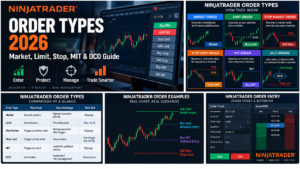
NinjaTrader Order Types Overview
NinjaTrader Order Types are the instructions that tell the platform how and when you want an order to execute. NinjaTrader’s current order-entry documentation supports Market, Limit, Stop Market, Stop Limit, and MIT orders across its trading controls. OCO functionality can be used to link working orders, while Time in Force settings such as Day and GTC determine how long eligible orders remain active.
| Order Type | Main Goal | Key Advantage | Main Risk |
|---|---|---|---|
| Market | Execute quickly at the best available price | Highest execution priority | Slippage and uncertain fill price |
| Limit | Control the worst acceptable price | Price discipline | Order may not fill |
| Stop Market | Trigger a market order after a stop price is reached | Strong execution priority after trigger | Fill can be worse than stop price |
| Stop Limit | Trigger a limit order after a stop price is reached | Adds price control | Can trigger but remain unfilled |
| MIT | Trigger a market order when price touches a selected level | Useful for pullback-style entry logic | Market-order slippage after trigger |
For the official definitions and platform behavior, review NinjaTrader’s Order Types documentation.
NinjaTrader Order Types: Market Orders
A Market order tells NinjaTrader to buy or sell at the best available market price. Among NinjaTrader Order Types, Market orders generally offer the fastest path to execution because they do not wait for a specific limit price.
The tradeoff is price uncertainty. The price visible when you click Buy or Sell is not guaranteed to be the final fill price. In fast futures markets, the order can fill several ticks away from the last displayed price if available liquidity changes before execution reaches the exchange.
Market orders can make sense when execution is more important than a small price difference—for example, when exiting a position that must be closed immediately. They can be less attractive in thin markets, around major economic releases, or when spreads widen.
NinjaTrader’s documentation warns that Market orders can fill at a higher or lower price than expected. That is not necessarily a platform error; it is part of market-order behavior.
NinjaTrader Order Types: Limit Orders
A Limit order specifies the maximum price you are willing to pay when buying or the minimum price you are willing to accept when selling. For traders who care more about price control than immediate execution, Limit orders are among the most useful NinjaTrader Order Types.
A buy Limit order is generally placed at or below the current market, while a sell Limit order is generally placed at or above the current market. The order can execute at the selected price or better, but it may remain unfilled if the market never trades through enough available liquidity at that level.
Limit orders are commonly used for:
- pullback entries;
- profit targets;
- support and resistance entries;
- passive entries where price control is more important than immediate execution.
The main limitation is opportunity cost. A perfect price level is not useful if the market moves away without filling the order.

Stop Market Orders in NinjaTrader
A Stop Market order remains inactive until the market reaches the specified stop price. Once triggered, it becomes a Market order. Within NinjaTrader Order Types, this makes Stop Market orders useful for both protective exits and breakout entries.
For a long position, a sell Stop Market order can be placed below the market as a protective stop. If the stop level is reached, the order becomes a market order and seeks execution at the best available price.
For a breakout entry, a trader can place a buy Stop Market order above the current market or a sell Stop Market order below it. If price reaches the trigger, the order converts to a Market order.
The benefit is a relatively high probability of execution after triggering. The risk is slippage. A Stop Market order does not guarantee that the final fill will equal the stop price, particularly during gaps, rapid moves, or low-liquidity conditions.
Stop Limit Orders in NinjaTrader
A Stop Limit order combines a stop trigger with a limit price. When the stop price is reached, the order becomes a Limit order rather than a Market order.
NinjaTrader therefore requires both a Stop price and a Limit price for this order type. The distance between those two values determines how much execution-price flexibility the trader is willing to allow after the trigger.
Stop Limit can reduce unwanted slippage compared with Stop Market, but it creates a different risk: the order can trigger and still fail to fill if the market moves beyond the Limit price too quickly.
That tradeoff makes Stop Limit one of the NinjaTrader Order Types that requires the most care. For a protective stop, excessive price restriction can leave a trader exposed precisely when the market is moving aggressively against the position.
Market-if-Touched Orders in NinjaTrader
MIT stands for Market-if-Touched. An MIT order waits for the selected trigger price to be touched and then becomes a Market order.
This can sound similar to a Stop Market order, but the typical placement logic is different. Stop orders are commonly used when the trader wants execution as price moves through a trigger in the direction of momentum or risk. MIT orders are commonly used when price moves toward a target entry level and the trader wants a Market order once that level is touched.
For example, a trader expecting a pullback may place a buy MIT order below the current market. When price touches the MIT trigger, the order becomes a Market order and seeks execution.
Because the triggered order becomes a Market order, MIT still carries slippage risk. It provides trigger logic, not guaranteed execution at the exact trigger price.
NinjaTrader Order Types: OCO Orders
OCO means One Cancels Other. It is not a separate execution type in the same sense as Market or Limit. Instead, OCO is order-management logic that links multiple working orders.
NinjaTrader states that when one order in an OCO group is filled or canceled, the other linked orders are canceled. This makes OCO one of the most important risk-management features associated with NinjaTrader Order Types.
A common example is a bracket around an open long position:
- a sell Limit order above the market acts as the profit target;
- a sell Stop order below the market acts as the protective stop;
- both are linked with OCO logic;
- if the target fills, the stop is canceled;
- if the stop fills, the target is canceled.
NinjaTrader ATM strategies automatically use OCO logic for profit-target and stop-loss orders. Traders can also manually create OCO groups in supported order-entry interfaces.

NinjaTrader Order Types: Day vs GTC Time in Force
Time in Force works alongside NinjaTrader Order Types by controlling how long eligible working orders remain active.
Time in Force determines how long a working order remains active. NinjaTrader’s order interfaces and automation parameters support common TIF values including Day and GTC.
Day Orders
A Day order is intended to remain active for the applicable trading day or session according to the exchange and broker workflow. If it has not filled by the relevant expiration point, it does not continue indefinitely.
GTC Orders
GTC means Good-Til-Canceled. A GTC order can remain active across sessions until it is filled, canceled, or otherwise removed under brokerage or exchange rules.
GTC can be useful for longer-lived stops or targets, but traders must remember that a working order can remain active even after they stop watching the market. Always verify outstanding orders before shutting down or changing strategies.
Using NinjaTrader Order Types With ATM Strategies
ATM Strategy functionality can automate parts of trade management after an entry order is submitted. A typical ATM template can create a stop loss and one or more profit targets after the entry fills.
NinjaTrader links ATM stop-loss and profit-target orders using OCO logic. If the profit target fills, the corresponding protective stop is canceled; if the stop fills, the related target is canceled.
This can reduce manual order-management work, but automation does not remove execution risk. Stops can slip, targets may not fill, and incorrect quantities or template settings can create unintended exposure.
Before using ATM logic live, practice in simulation. See our NinjaTrader Demo Account 2026 guide before committing real capital.
Using NinjaTrader Order Types in SuperDOM
SuperDOM provides a ladder-style order-entry interface where traders can place and manage several NinjaTrader Order Types directly around market prices.
NinjaTrader’s SuperDOM documentation supports Limit, Stop Market, Stop Limit, and MIT order submission through the price ladder. The order display uses different visual styles so traders can distinguish working order types and ATM stop/target orders.
The ladder format is useful because it shows the order relative to current market price, but fast entry also creates operational risk. A wrong click, wrong quantity, wrong account, or wrong contract month can create a real live order immediately.
Always verify the selected account and instrument before submitting from SuperDOM. For real-money trading preparation, see our NinjaTrader Live Account 2026 guide.
Execution Risks With NinjaTrader Order Types
No order type eliminates trading risk. Each one simply changes which risk receives priority.
Market Order Risk
Execution is prioritized, but price is not guaranteed. Slippage can be significant in fast or thin markets.
Limit Order Risk
Price is controlled, but execution is not guaranteed. The market can touch or approach the limit without providing enough available liquidity for your position to fill.
Stop Market Risk
The order usually prioritizes exit after the stop is triggered, but the fill can be worse than the stop price.
Stop Limit Risk
The order adds price control, but it can fail to execute after triggering, leaving the position exposed.
MIT Risk
The trigger can work as intended, but the resulting Market order can still slip.
The best NinjaTrader Order Types depend on the goal of the trade. A trader trying to guarantee an exact price and a trader trying to guarantee immediate execution are asking for two different things.
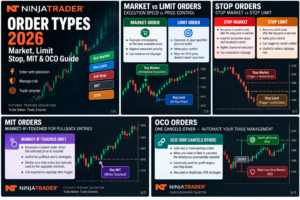
NinjaTrader Order Entry Checklist
Before submitting any live order, review:
- the correct live or simulation account;
- the correct futures symbol and contract month;
- Buy or Sell direction;
- contract quantity;
- order type;
- Limit price if applicable;
- Stop price if applicable;
- Time in Force;
- OCO or ATM settings if used;
- current spread and liquidity;
- planned maximum loss if the order fills;
- working orders already active in the account.
This checklist is especially important when switching between different NinjaTrader Order Types. A Stop Limit accidentally entered as a Stop Market, or a live account accidentally selected instead of simulation, can materially change the outcome.
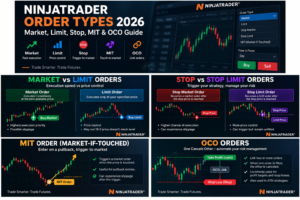
NinjaTrader Order Types: Pros and Cons
Pros
- Multiple order types support different execution objectives.
- Market orders prioritize speed when immediate execution matters.
- Limit and Stop Limit orders provide additional price control.
- OCO helps automate mutually exclusive exit orders.
- ATM strategies can automate stop-loss and profit-target management.
- SuperDOM provides fast visual order entry around market price.
Cons
- No order type guarantees both price and execution.
- Market and triggered-market orders can experience slippage.
- Limit and Stop Limit orders may remain unfilled.
- OCO and ATM settings can create mistakes if quantities are configured incorrectly.
- Fast ladder entry increases the importance of checking account, symbol, and quantity.
NinjaTrader Order Types FAQ
What NinjaTrader Order Types are available?
NinjaTrader supports Market, Limit, Stop Market, Stop Limit, and Market-if-Touched orders across its core order-entry and automation tools. OCO logic can also link related working orders.
What is a Market order in NinjaTrader?
A Market order seeks execution at the best available price. It prioritizes getting filled rather than guaranteeing a specific price.
What is the difference between Stop Market and Stop Limit?
A Stop Market order becomes a Market order after the stop price is triggered. A Stop Limit order becomes a Limit order after the stop is triggered, adding price control but creating a risk that the order does not fill.
What is an MIT order?
MIT means Market-if-Touched. The order waits until the selected trigger price is touched and then becomes a Market order.
What does OCO mean in NinjaTrader?
OCO means One Cancels Other. Orders linked in the same OCO group are managed together so that when one order fills or is canceled, the remaining linked orders are canceled.
Do ATM strategies use OCO?
Yes. NinjaTrader states that ATM stop-loss and profit-target orders are submitted using OCO relationships.
What is the difference between Day and GTC?
Day controls are intended for the applicable trading day or session, while GTC orders can remain working across sessions until filled or canceled, subject to broker and exchange rules.
Which NinjaTrader Order Type is safest?
There is no universally safest order type. Market orders prioritize execution, while Limit and Stop Limit orders prioritize price control. The appropriate choice depends on liquidity, volatility, trade objective, and the risk of not getting filled.
Final Verdict: NinjaTrader Order Types in 2026
NinjaTrader Order Types provide enough flexibility for most futures entry and exit workflows. Market, Limit, Stop Market, Stop Limit, and MIT orders each solve a different execution problem, while OCO and ATM logic help coordinate related orders.
The key is understanding the tradeoff. Market-style execution can reduce the risk of remaining in an unwanted position but can increase slippage. Limit-style execution provides price control but can leave an order unfilled. Stop Limit provides the most obvious example of this tension because it can trigger without actually exiting the position.
Practice each order type in simulation before using it with real money. Then verify account, contract month, quantity, price fields, Time in Force, and OCO or ATM settings before every live submission.
Affiliate Disclosure: TradeboticsAI may earn compensation when eligible users take an action through certain links on this page. Our content remains editorially independent and is provided for educational and comparison purposes.
Risk Disclosure: Futures trading involves substantial risk of loss and is not suitable for every investor. No order type guarantees execution at a specific price, and no protective order guarantees that losses will be limited to the intended amount. Slippage, gaps, thin liquidity, exchange conditions, rejected orders, and technical problems can affect execution. Practice in simulation and verify current NinjaTrader order behavior before trading live.