Developer platform guide · Updated September 17, 2026 · NinjaTrader ecosystem
NinjaTrader API is the developer layer for traders, software developers and fintech builders who want to connect external applications, automate workflows, access trading functionality and work with market data around the NinjaTrader ecosystem.
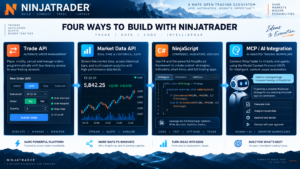
In 2026, the developer stack extends well beyond one interface. Developers can work with the REST Trade API, real-time WebSocket functionality, the WebSocket Market Data API, NinjaScript/C# for NinjaTrader 8 Desktop, the legacy Automated Trading Interface (ATI), and newer AI-oriented tools such as NinjaTrader’s hosted MCP server.
The correct choice depends on what you are building. An external web service has different requirements from a NinjaScript strategy running inside NinjaTrader Desktop, while a market-data application has different responsibilities from software allowed to submit live futures orders.
Quick Answer: Which NinjaTrader API Should You Use?
- REST Trade API: external apps working with authentication, accounts, orders, positions and trading workflows.
- WebSocket: event-driven updates where continuous communication is preferable to repeated polling.
- WebSocket Market Data API: streaming quotes, market depth and other real-time market information.
- NinjaScript / C#: indicators, strategies, AddOns and custom tools running directly inside NinjaTrader 8 Desktop.
- ATI: legacy external signal integration; useful in specific workflows but not a full brokerage or market-data API.
- MCP Server: AI-agent access to supported NinjaTrader account, market-data and trading tools through an authorized connection.

Concept illustration of the NinjaTrader developer ecosystem. It is not a live brokerage account screenshot.
Table of Contents
- What is NinjaTrader API?
- Developer stack overview
- REST vs WebSocket vs NinjaScript vs ATI vs MCP
- REST Trade API
- WebSocket and real-time data
- NinjaScript / C#
- Automated Trading Interface (ATI)
- NinjaTrader MCP Server
- Python and external applications
- Automated trading architecture
- Security and reliability
- Testing before live deployment
- Costs, hosting and infrastructure
- Recommended development workflow
- Pros and cons
- Who should use it?
- FAQ
- Final verdict
What Is NinjaTrader API?
NinjaTrader API refers to the developer interfaces available for building trading integrations, market-data applications, automation tools, indicators, strategies and software around the NinjaTrader platform.
The modern developer environment should not be treated as one single API. NinjaTrader currently documents separate interfaces for external trading applications, real-time market data, NinjaScript desktop development, web development and AI-oriented integrations.
This distinction matters because choosing the wrong interface can create unnecessary complexity. A program that simply needs account and order access should not automatically be designed as a NinjaTrader Desktop AddOn, while a custom indicator that must render inside a NinjaTrader chart does not necessarily need an external REST service.
For a broader look at the trading platform itself, see our NinjaTrader Review 2026.
NinjaTrader Developer Stack in 2026
The current NinjaTrader developer documentation organizes the ecosystem around several different development paths.
| Technology | Primary Role | Typical Environment | Best Suited For |
|---|---|---|---|
| REST Trade API | Trading and account functionality | External applications and services | Orders, positions, accounts, risk and integrations |
| WebSocket | Real-time event communication | External applications | Streaming updates and event-driven architectures |
| Market Data API | Real-time market-data streaming | External applications | Quotes, depth and market-data tools |
| NinjaScript / C# | Native desktop development | NinjaTrader 8 Desktop on Windows | Indicators, strategies, AddOns and custom platform components |
| ATI | External trade-signal processing | Desktop/external bridge | Legacy automation and signal integration |
| MCP Server | AI-agent interaction | Authorized remote connection | Natural-language account, market and supported trading workflows |
NinjaTrader API vs WebSocket vs NinjaScript vs ATI vs MCP
The most important architectural decision is not simply whether to use NinjaTrader API, but which part of the developer stack matches the application.
Choose REST When:
- your software runs outside NinjaTrader Desktop;
- you need account, order, position or trading functionality;
- you are building a server-side application, dashboard or integration;
- request-response behavior fits the operation.
Choose WebSocket When:
- the application needs event-driven updates;
- repeated HTTP polling would be inefficient;
- you need a persistent connection for live state changes;
- the application consumes streaming market data.
Choose NinjaScript When:
- the code should run directly inside NinjaTrader 8 Desktop;
- you are creating an indicator or backtestable strategy;
- you need a custom AddOn, drawing tool or platform extension;
- tight integration with NinjaTrader charts and desktop components matters.
Choose ATI When:
- you have a legacy external signal-generation workflow;
- the external application needs to pass trade instructions into NinjaTrader Desktop;
- the limited ATI model is sufficient for the application.
Choose MCP When:
- you are specifically building an authorized AI-agent workflow;
- natural-language access to supported NinjaTrader functionality is useful;
- the project benefits from a hosted Model Context Protocol connection rather than a traditional custom UI.
NinjaTrader REST Trade API
The REST Trade API is one of the primary external NinjaTrader API options. NinjaTrader describes it as the trading interface for authentication, orders, positions, accounting and risk-related workflows.
REST is appropriate when an application needs explicit request-response operations. A dashboard might query account information, while an execution service may construct a validated order request after its strategy and risk systems approve an action.
Production software should never assume that a successful network request automatically means a trade reached the exact final state the application expected. Responses must be validated and the application should reconcile its own state against the authoritative account state.
Developers should also avoid hard-coding infrastructure assumptions. NinjaTrader’s current developer documentation advises applications to obtain API hosts from the authentication response when applicable rather than assuming every user will always use the same host.
REST Integration Checklist
- authenticate using the documented access flow;
- store credentials and tokens securely;
- validate every response;
- handle authorization expiration;
- implement controlled retry logic;
- respect rate and permission constraints;
- log failures without logging secrets;
- reconcile orders, positions and account state.
NinjaTrader WebSocket and Real-Time Market Data
WebSocket connectivity is important when a NinjaTrader API application needs continuously updating information.
Unlike repeated HTTP polling, a WebSocket connection remains open and can receive event-driven messages. NinjaTrader documents WebSocket functionality for real-time communication and a dedicated market-data authorization flow.
Market-data applications should be designed for:
- disconnects and reconnects;
- stale-data detection;
- subscription management;
- duplicate or delayed messages;
- unexpected connection closure;
- market-data permission changes;
- exchange entitlement requirements.
NinjaScript / C#: Native NinjaTrader Desktop Development
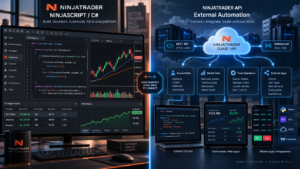
NinjaScript is NinjaTrader’s C# programming framework for NinjaTrader 8 Desktop. It is different from an external NinjaTrader API application because the code runs inside the desktop platform itself.
NinjaTrader currently documents NinjaScript development for:
- custom indicators;
- automated and backtestable strategies;
- AddOns;
- drawing tools;
- custom bar types;
- chart styles;
- Market Analyzer columns;
- SuperDOM columns;
- optimizers and performance components.
NinjaScript uses C# and runs inside NinjaTrader 8 Desktop on Windows. Developers can use the built-in NinjaScript Editor, while more advanced AddOn projects can also use development environments such as Visual Studio.
Users who want to create strategies without starting directly from C# can also review our NinjaTrader Strategy Builder 2026 guide.
NinjaTrader Automated Trading Interface (ATI)
The Automated Trading Interface is an older but still relevant part of NinjaTrader Desktop automation.
The ATI allows external applications to communicate trading signals to NinjaTrader for automated order execution. NinjaTrader documents examples including external charting software, custom applications, spreadsheets and black-box trading systems.
ATI workflows include technologies such as file-based Order Instruction Files and DLL integration. It can still be useful for legacy software or specialized desktop workflows, but developers starting a new external application should compare it carefully against the modern REST and WebSocket developer stack.
| ATI | Modern REST/WebSocket APIs |
|---|---|
| Primarily external trade-signal processing | Broader programmatic application architecture |
| Desktop-oriented legacy workflow | Designed for external applications and services |
| File/DLL and related integration methods | HTTP and WebSocket protocols |
| Not a full brokerage/market-data API | Dedicated trading and market-data interfaces |
NinjaTrader MCP Server and AI Agents
The 2026 NinjaTrader developer stack also includes a hosted Model Context Protocol server.
MCP is designed to let authorized AI agents connect to supported external tools. NinjaTrader’s documentation describes use cases involving account information, positions, market data and supported order workflows.
This does not mean an AI system should be given unrestricted trading authority. Any AI-enabled trading architecture should still apply explicit permissions, position limits, order-size limits, confirmation policies, logging and emergency shutdown controls.
MCP is therefore best understood as another developer interface, not as a substitute for strategy design, risk management or human oversight.
Can You Use Python with NinjaTrader API?
Python is not the language used by NinjaScript: NinjaScript uses C# and runs inside NinjaTrader 8 Desktop.
External applications are different. Because the modern external NinjaTrader interfaces use standard HTTP and WebSocket protocols, developers can architect applications in languages capable of working with those protocols, including Python, provided the implementation follows the current NinjaTrader authentication, authorization and API specifications.
A Python service might therefore perform analytics, risk checks or application logic externally while communicating through the supported external interface. That architecture is fundamentally different from installing a Python strategy directly as a NinjaScript strategy inside NinjaTrader Desktop.
Python / external service → REST or WebSocket integration.
C# strategy inside NinjaTrader Desktop → NinjaScript.
NinjaTrader API for Automated Trading
NinjaTrader API can support automated trading workflows, but automation should be designed around explicit state and risk controls.
NinjaTrader’s current API conventions require algorithmically generated orders to be identified appropriately as automated. Automated execution should therefore be distinguishable from orders manually entered by a person.
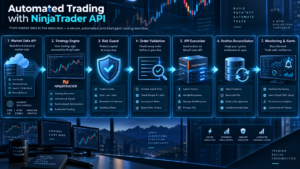
A practical production architecture can be separated into:
Every layer should have a clear responsibility. Strategy code should not silently bypass position limits, and execution code should not invent a new signal because market data briefly disconnects.
Minimum Risk Controls
- maximum position size;
- maximum order size;
- daily or session loss limits;
- duplicate-order prevention;
- maximum order frequency;
- connection-state validation;
- market-data freshness checks;
- account-state reconciliation;
- manual kill switch;
- audit logging and alerts.
NinjaTrader API Security and Reliability
Security is a core requirement for any application allowed to interact with a brokerage account.
Credentials, access tokens and other sensitive values should never be hard-coded into public repositories, browser-visible scripts or examples intended for distribution.
A secure NinjaTrader API architecture should apply least-privilege principles: each component should receive only the permissions it actually requires.
Security Checklist
- use secure secret storage;
- never commit credentials to Git repositories;
- avoid exposing secrets in application logs;
- separate development, simulation and live environments;
- rotate or revoke credentials when appropriate;
- restrict live execution permissions;
- monitor authentication failures;
- record security-relevant events.
Reliability matters just as much as authentication. The application needs to know whether it is connected, whether data is current, whether an order was acknowledged and whether local state still matches the actual brokerage account.
Testing Before Live NinjaTrader API Automation
A successful backtest is not evidence that live automation is reliable.
Before a NinjaTrader API application is allowed to trade live, developers should test failure cases as aggressively as normal cases.
Test Scenarios
- rejected orders;
- partial fills;
- connection loss;
- authentication expiration;
- stale market data;
- duplicate requests;
- application restarts;
- unknown account state;
- strategy/account position mismatch;
- unexpected API responses;
- risk-limit breaches;
- inability to confirm whether an order was accepted.
Simulation should be used to validate the workflow before live execution, but simulated and historical behavior does not reproduce every aspect of real markets.
For testing historical market workflows inside the platform, see our NinjaTrader Market Replay review.
NinjaTrader API Costs, Hosting and Infrastructure
The cost of building with NinjaTrader API is not limited to the API interface itself.
A production system may also create expenses for:
- NinjaTrader brokerage and trading fees;
- exchange market-data subscriptions;
- VPS or cloud hosting;
- databases and object storage;
- monitoring and alerting services;
- logging infrastructure;
- backup and disaster-recovery systems;
- developer time and maintenance;
- third-party software or data services.
An application running locally on one Windows workstation has a different cost structure from a redundant cloud service running continuously with monitoring and database infrastructure.
For brokerage commissions, market-data costs and related account charges, see our NinjaTrader Fees 2026 guide.
Recommended NinjaTrader API Development Workflow
A disciplined workflow reduces the chance that technical mistakes become trading mistakes.
- Define the scope. Decide exactly what the application needs to read and what it may change.
- Choose the interface. Select REST, WebSocket, NinjaScript, ATI or MCP based on architecture rather than familiarity alone.
- Build read-only functionality first. Confirm that accounts, instruments and market data are interpreted correctly.
- Add authentication and recovery. Handle expired credentials and broken connections before enabling orders.
- Build state reconciliation. Compare local state with authoritative account state.
- Use simulation. Test order construction and lifecycle behavior without risking capital.
- Add the Risk Guard. Enforce size, exposure, frequency and loss limits outside the strategy signal itself.
- Implement logging. Requests, responses, orders, errors, connections and risk decisions should be traceable.
- Test failure scenarios. Intentionally test disconnects, rejected orders and restart behavior.
- Move to live cautiously. Use tightly controlled exposure and active supervision.
A smaller system with clear state management is usually safer than a feature-rich platform whose execution behavior is difficult to understand.
NinjaTrader API Pros and Cons
Pros
- Modern external REST trading interface.
- Real-time WebSocket functionality.
- Dedicated market-data capabilities.
- Deep native C# development through NinjaScript.
- Supports external apps, dashboards and integrations.
- ATI remains available for specific legacy workflows.
- MCP adds an AI-oriented integration option.
- Large NinjaTrader desktop development ecosystem.
Cons
- Production development requires real software-engineering skill.
- Different interfaces have different purposes and limitations.
- Authentication, state and failure handling remain developer responsibilities.
- Automated execution can magnify software errors.
- Market-data entitlements and account permissions still apply.
- NinjaScript is Windows desktop specific.
- ATI should not be mistaken for a complete modern API.
- Hosting and monitoring can add operational cost.
Who Should Use NinjaTrader API?
NinjaTrader API is most appropriate for developers, technically experienced traders, fintech builders and teams that need more control than the standard manual interface provides.
Good Use Cases
- custom trading dashboards;
- external risk-management systems;
- account analytics applications;
- automated execution services;
- market-data applications;
- custom NinjaTrader Desktop strategies;
- proprietary indicators and AddOns;
- brokerage integrations;
- AI-assisted workflows with explicit controls.
Probably Not Necessary If:
- you simply want to place discretionary futures trades manually;
- built-in NinjaTrader functionality already covers the workflow;
- you do not have the technical resources to maintain production automation;
- you expect an API to turn an unvalidated strategy into a profitable system.
Official NinjaTrader Developer Resources
- NinjaTrader Developer Documentation
- NinjaScript / C# Documentation
- NinjaTrader WebSocket Documentation
- NinjaTrader MCP Documentation
- NinjaTrader Automated Trading Interface Documentation

NinjaTrader API FAQ
Does NinjaTrader API support automated trading?
Yes. NinjaTrader provides programmatic trading interfaces and NinjaScript strategies that can be used in automated workflows. Automated systems still require testing, monitoring, risk limits and failure handling.
Is NinjaTrader API the same as NinjaScript?
No. External NinjaTrader APIs are designed for applications outside NinjaTrader Desktop. NinjaScript is NinjaTrader’s C# framework for indicators, strategies, AddOns and other components running inside NinjaTrader 8 Desktop.
Does NinjaTrader have a REST API?
Yes. NinjaTrader’s current developer documentation includes a REST Trade API for authentication, trading, positions, accounts and related functionality.
Does NinjaTrader provide WebSocket access?
Yes. NinjaTrader documents WebSocket functionality for real-time communication and market-data streaming.
Can I use Python with NinjaTrader API?
Python is not the NinjaScript language; NinjaScript uses C#. However, an external application written in Python can be architected around standard HTTP and WebSocket interfaces when the implementation follows NinjaTrader’s current authentication, permissions and API specifications.
What is NinjaTrader ATI?
The Automated Trading Interface is a NinjaTrader Desktop interface used to process external trade signals. NinjaTrader explicitly states that ATI is not a complete brokerage or market-data API.
What is NinjaTrader MCP?
NinjaTrader’s MCP server is an AI-oriented integration based on Model Context Protocol. It allows authorized AI agents to interact with supported account, market-data and trading functionality.
Should I use REST API or NinjaScript?
Use an external API when the application needs to run outside NinjaTrader Desktop. Use NinjaScript when the code should run directly inside NinjaTrader 8 as an indicator, strategy, AddOn or other native desktop component.
Can NinjaTrader API guarantee profitable automated trading?
No. An API provides technical access, not a trading edge. Market risk, leverage, slippage, latency, strategy failure, software errors and operational mistakes can all produce losses.
Do I need market-data subscriptions for NinjaTrader API?
Market-data permissions and exchange entitlements depend on the account and application. API access does not automatically mean every exchange feed or data entitlement is included.
Is NinjaTrader API suitable for beginners?
Basic development can be learned, but production trading integrations require knowledge of programming, authentication, state management, testing and risk controls. Beginners may find built-in platform functionality or Strategy Builder easier to start with.
Final Verdict: NinjaTrader API 2026
NinjaTrader API has evolved into a broader developer ecosystem rather than a single integration method.
External applications can use modern trading and WebSocket interfaces, while NinjaScript remains the primary C# framework for deep NinjaTrader 8 Desktop development. ATI still has a role in legacy external signal workflows, and MCP introduces a newer path for authorized AI-agent integrations.
The strongest architecture depends on where the code must run, what information it needs, how much trading authority it should receive and how reliably the system can manage failures.
For automated futures trading, the API itself is only the execution infrastructure. Strategy validation, position sizing, risk limits, data quality, monitoring, logging and operational controls remain separate responsibilities.