NinjaTrader Futures Expiration 2026: First Notice Date, Last Trade Day & Delivery Guide
NinjaTrader Futures Expiration rules matter because every futures contract has a defined life cycle. A contract eventually reaches its last trading day, and physically deliverable markets also have a First Notice Date that can create delivery risk. In 2026, NinjaTrader states that trading in physically deliverable futures is prohibited beginning on the business day before the earlier of the Last Trade Date or First Notice Date through the Last Trade Date. Accounts that still hold a position or submit an order after that broker roll date can be liquidated and charged applicable fees.
Quick Answer: NinjaTrader Futures Expiration depends on the contract. Cash-settled futures generally settle financially at expiration, while physically deliverable futures must be closed or rolled before NinjaTrader’s delivery-risk cutoff. NinjaTrader’s current policy uses the business day preceding the earlier of the Last Trade Date or First Notice Date as the critical broker deadline for physically deliverable contracts. Check the exact contract specifications before every expiration cycle.
Affiliate Disclosure: TradeboticsAI may receive compensation if you register or complete an eligible action through links on this page, at no additional cost to you. This does not affect our editorial analysis.
What Is NinjaTrader Futures Expiration?
NinjaTrader Futures Expiration refers to the deadlines and broker rules that apply as a futures contract approaches the end of its trading life. Futures are dated instruments. Unlike shares of stock, a specific futures contract does not remain active indefinitely.
Each contract month has exchange-defined specifications that can include an expiration date, last trading day, settlement method, First Notice Date, and delivery rules. The exact schedule varies by product, so a trader should never assume that every market expires on the same day or follows the same quarterly cycle.
Expiration is also different from rollover. Expiration is the end-of-contract event. Rollover is the trader’s decision to close exposure in the expiring contract and move that exposure to a later contract month before the old contract reaches its critical deadline.
For current broker rules, review NinjaTrader’s official Margin Policy and Position Management page.
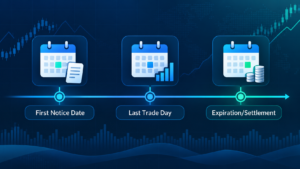
NinjaTrader Futures Expiration Date vs Last Trade Date vs First Notice Date
Understanding NinjaTrader Futures Expiration starts with separating three dates that traders often confuse.
| Term | What It Means | Why It Matters |
|---|---|---|
| Expiration Date | The contract reaches the end of its defined life and settlement process. | The contract can no longer be treated like an ordinary active month. |
| Last Trade Date | The final date or time when trading in that contract is permitted by the exchange. | Open positions must be managed before trading ends. |
| First Notice Date | The first day a holder of a physically delivered contract can become subject to delivery assignment. | Retail traders generally close or roll before this delivery-risk window. |
For physically delivered markets, the First Notice Date can become more important to a retail trader than the headline expiration date. NinjaTrader’s broker policy focuses on the earlier of the Last Trade Date or First Notice Date when determining the restricted delivery-risk period.

NinjaTrader Futures Expiration: Cash-Settled vs Physically Delivered
The settlement method determines what happens when a contract reaches NinjaTrader Futures Expiration.
Cash-Settled Futures
Cash-settled futures do not require delivery of a physical commodity. The final settlement is financial, based on the contract’s settlement rules. Equity-index futures such as the E-mini S&P 500 are common examples. Traders can still choose to close or roll before the final settlement because liquidity often shifts to the next contract and settlement can create additional operational complexity.
Physically Delivered Futures
Physically delivered futures can create an obligation involving the underlying commodity or deliverable asset if held too far into the delivery process. Crude oil, gold, grains, and some Treasury futures are examples of markets where delivery procedures matter.
NinjaTrader is a retail futures broker and does not intend retail traders to drift unintentionally into physical delivery. Its published policy therefore restricts trading in physically deliverable contracts before the earlier critical date and can liquidate accounts that remain exposed beyond the broker’s roll deadline.
NinjaTrader Futures Expiration: Delivery and First Notice Policy
NinjaTrader’s current margin and position-management policy states that trading in physically deliverable futures contracts is prohibited beginning on the business day preceding the earlier of the Last Trade Date or First Notice Date through the Last Trade Date.
That means NinjaTrader Futures Expiration has a broker-level risk cutoff that can occur before the exchange’s final expiration event. NinjaTrader also states that an account holding a position or placing an order after that roll date is subject to liquidation and associated fees.
This rule is important because a trader may look only at an exchange expiration date and mistakenly believe there is more time available. The broker’s delivery-risk date can be earlier and is the practical deadline that matters for a NinjaTrader brokerage account.
For physically deliverable contracts, plan the exit or rollover before the restricted period begins. Do not depend on forced liquidation as a normal position-management method.
NinjaTrader Futures Expiration Examples: ES, Crude Oil and Gold
The exact NinjaTrader Futures Expiration schedule varies by product. The examples below illustrate why traders must use contract-specific rules rather than one universal expiration calendar.
| Market | Typical Cycle / Style | Key Expiration Consideration |
|---|---|---|
| E-mini S&P 500 (ES) | Quarterly cash settlement | Commonly expires on the third Friday of the contract month; liquidity usually shifts to the next quarterly contract beforehand. |
| Crude Oil (CL) | Monthly, physically deliverable | Trading ceases according to a product-specific business-day formula; delivery risk means broker deadlines must be checked before the final trading day. |
| Gold (GC) | Physically deliverable | The exact Last Trade Date and First Notice Date should be checked for the active contract before holding near expiration. |
NinjaTrader’s educational material currently describes ES as a quarterly contract, while Crude Oil uses a monthly expiration cycle and is physically deliverable. The correct operational habit is to verify the active month’s exchange specifications rather than memorize an old calendar.
Should You Close or Roll Before Futures Expiration?
As NinjaTrader Futures Expiration approaches, a trader generally has two practical choices: close the position or roll the exposure into a later contract month.
Close the Position
Closing ends the market exposure. This is appropriate when the trade thesis is complete, the trader no longer wants exposure, or the new contract does not justify reopening the position.
Roll the Position
A rollover means closing the expiring contract and opening the desired position in a later contract of the same underlying market. This maintains market exposure but creates new transactions, meaning commissions, spread costs, slippage and potentially a different price basis.
For the complete platform workflow, see our NinjaTrader Contract Rollover 2026 guide.
Do not confuse changing a chart’s contract month with rolling a live position. An actual brokerage position must be managed separately.
How NinjaTrader Helps Manage Futures Expiration
NinjaTrader provides rollover notifications and contract-selection tools that can help traders move from the expiring front month to the next active contract. The platform can also update eligible futures instruments through its rollover workflow.
NinjaTrader’s educational material states that as contracts approach expiration, volume commonly shifts into the next contract, which then becomes the new front month. Watching this liquidity migration can help traders avoid remaining in a thin expiring market simply because the old symbol is still loaded in a workspace.
Platform assistance does not eliminate responsibility for NinjaTrader Futures Expiration. Traders should still verify contract month, settlement style, First Notice Date, Last Trade Date, open positions and working orders.
Open Orders, Strategies and Expiring Contracts
Expiration management should include more than the visible position. Working orders, ATM orders, stop orders, profit targets and automated strategies can still reference the old contract month.
Before a NinjaTrader Futures Expiration deadline, confirm that every live order points to the intended contract. A stop attached to an expiring contract does not automatically protect a separate position opened in the next month.
NinjaTrader’s rollover documentation also states that NinjaScript strategies are not automatically rolled forward by the batch rollover function. Algorithmic traders should manually review the instrument and expiry used by every enabled strategy before changing contract months.
This is especially important if the old contract still has a live position. Changing charts or strategy inputs without reconciling the brokerage position can create duplicate or unmanaged exposure.
Expiration, Margin and Liquidation Risk
NinjaTrader Futures Expiration can interact with margin risk. As liquidity changes, volatility and broker risk controls can also change, and holding a position near a restricted delivery date can lead to broker liquidation.
NinjaTrader’s current policy states that accounts failing margin requirements may be liquidated. Its fee schedule currently lists margin and delivery liquidation execution fees, including $25 for a first violation and $50 for subsequent violations, with a separate $10 rate for specified CME e-Nano and U.S. perpetual-style futures.
The economic cost of forced liquidation can be larger than the fee itself because the position may be closed at an unfavorable market price. The trader may also incur commissions, exchange fees and slippage.
For margin-related account risk, see our NinjaTrader Margin Call Fee 2026 and NinjaTrader Excess Margin 2026 guides.

NinjaTrader Futures Expiration Checklist
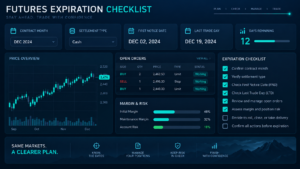
Before trading a contract near expiration, review this checklist:
- confirm the exact product symbol and contract month;
- identify whether settlement is cash or physical;
- check the official expiration date;
- check the Last Trade Date and exact cutoff time;
- check the First Notice Date for physically deliverable products;
- identify NinjaTrader’s broker roll deadline;
- review current volume and liquidity in the expiring and next contracts;
- decide whether to close or roll the position;
- review open stops, targets and working orders;
- review NinjaScript strategies separately;
- check current margin and excess margin;
- confirm that no old-contract exposure remains after the transition.
A strong NinjaTrader Futures Expiration process is calendar-driven rather than reactive. Mark the key dates before opening the trade, not after liquidity has already disappeared or the broker’s delivery-risk deadline has arrived.

NinjaTrader Futures Expiration: Pros and Cons of the Broker Controls
Pros
- Published delivery and First Notice policy creates a clear broker risk boundary.
- Rollover tools can help move platform instruments to later contract months.
- Automatic liquidation policies reduce unintended physical-delivery exposure.
- Rollover alerts can help identify the transition toward a new front month.
- Contract specifications make settlement style and expiration rules researchable.
Cons
- Expiration rules differ significantly between futures products.
- Broker delivery deadlines can occur before the exchange’s final expiration event.
- Forced liquidation can create fees and unfavorable execution.
- Platform rollover does not automatically manage every live order or strategy.
- Physical-delivery contracts require more calendar discipline than cash-settled markets.
NinjaTrader Futures Expiration FAQ
What happens when a futures contract expires on NinjaTrader?
The outcome depends on the contract. Cash-settled futures settle financially, while physically deliverable futures are subject to delivery-related rules. NinjaTrader restricts trading in physically deliverable contracts before the earlier of the Last Trade Date or First Notice Date and can liquidate positions that remain beyond its broker deadline.
What is the First Notice Date?
The First Notice Date is the first day on which a holder of a physically delivered futures contract can become subject to delivery assignment. It varies by contract and exchange.
What is the Last Trade Date?
The Last Trade Date is the final day or time the exchange permits trading in a particular contract month. It is not always identical to the settlement or First Notice Date.
Does NinjaTrader allow physical delivery?
NinjaTrader’s published policy is designed to prevent retail accounts from remaining in physically deliverable futures into the prohibited delivery-risk period. Positions or orders after the applicable broker roll date can be liquidated.
When should I close a physically delivered futures position?
Under NinjaTrader’s current broker policy, trading is prohibited beginning on the business day preceding the earlier of the Last Trade Date or First Notice Date. Traders should manage positions before that restricted period begins.
Does NinjaTrader automatically roll my position?
No. Platform rollover can update instrument months in workspaces, but a live position must be actively closed in the old contract and reopened in the new contract if the trader wants to maintain exposure.
Can NinjaTrader Futures Expiration cause additional fees?
Yes. Forced liquidation, margin violations, commissions, exchange fees and slippage can create costs. NinjaTrader publishes execution fees for applicable margin and delivery liquidation events.
How do I know which contract month is active?
Check the current volume and liquidity, NinjaTrader rollover alerts, and the exchange contract specifications. The next front month often becomes the preferred contract before the old contract formally expires.
Final Verdict: NinjaTrader Futures Expiration in 2026
NinjaTrader Futures Expiration is not simply a date on a calendar. It is a sequence involving the active contract month, Last Trade Date, First Notice Date, settlement method, broker roll deadline, liquidity migration and, when applicable, delivery risk.
For cash-settled index futures, expiration management is generally simpler because there is no physical commodity to deliver. Physically delivered futures require stricter attention because NinjaTrader prohibits trading during the delivery-risk period and can liquidate positions or orders that remain after the broker’s roll deadline.
The safest process is to know the dates before opening the trade, monitor when liquidity moves to the next contract, and decide in advance whether you will close or roll. Verify every open position, working order and automated strategy after the transition so that no expiring-contract exposure remains unintentionally.
Affiliate Disclosure: TradeboticsAI may earn compensation when eligible users take an action through certain links on this page. Our content remains editorially independent and is provided for educational and comparison purposes.
Risk Disclosure: Futures trading involves substantial risk of loss and is not suitable for every investor. Futures contracts expire, margin requirements can change, and physically delivered contracts can create delivery-related risk. Forced liquidation can occur at unfavorable prices. Verify the current expiration date, Last Trade Date, First Notice Date, broker roll deadline, settlement method and contract specifications directly with NinjaTrader and the relevant exchange before trading.