Best Futures Trading VPS 2026: Top 7 Low-Latency Servers
If you are searching for the best futures trading VPS in 2026, the goal is not simply to rent a fast remote computer. A trading VPS should keep your platform online, provide enough CPU and memory for your charts and automated strategies, reduce dependence on home power and internet, and place your trading environment on a network route that makes sense for your broker and data feed. The best futures trading VPS should improve infrastructure reliability without being treated as a shortcut to profitable execution.

Quick Answer
Our overall pick for the best futures trading VPS is ChartVPS for traders who prioritize futures-focused infrastructure, modern high-frequency CPU hardware, Windows support, Chicago availability, and provider-published 0–1 ms connectivity to CME. TradingVPS is our value pick, while QuantVPS is a strong choice for traders who want multiple futures-specific server tiers and broad platform compatibility. TraderVPS, Cloudzy, FXVM, and Kamatera cover premium, budget, multi-location, and general-purpose cloud use cases.
Affiliate Disclosure: TradeboticsAI may earn compensation from certain links on this page. Our VPS rankings are editorial. The NinjaTrader link used on this page is an affiliate link, while inclusion in the VPS comparison does not imply that every provider pays TradeboticsAI.
Best Futures Trading VPS Comparison
The best futures trading VPS depends on what you actually run. One NinjaTrader chart with a lightweight strategy has very different requirements from several workspaces, multiple data feeds, trade copiers, order-flow tools, backtests, and simultaneous automated strategies. The figures below are based on public provider information available when this page was reviewed; latency and uptime figures are provider-published rather than independent TradeboticsAI measurements.
| Provider | Best For | Futures Focus | Chicago Option | Published Entry Price | Main Trade-Off |
|---|---|---|---|---|---|
| ChartVPS | Best overall | High | Yes | From about $50/mo | More expensive than budget cloud VPS |
| TradingVPS | Best value | High | Yes | From about $19/mo | Entry tier is modest for heavy workloads |
| QuantVPS | Scaling automated setups | High | Yes | From about $29.99/mo | Higher tiers become expensive |
| TraderVPS | Premium futures hosting | High | Yes | Plan-dependent | Premium configurations cost substantially more |
| Cloudzy | Budget NinjaTrader hosting | Medium | U.S. regions available | From about $14.48/mo | Not as futures-specialized as top picks |
| FXVM | Multi-location trading VPS | Medium | Yes | From about $29.75/mo promotional | Broader forex/trading focus |
| Kamatera | Custom cloud infrastructure | Low | Yes | Configuration-based | Requires more self-management |
Prices change frequently and Windows licensing or optional services can alter the final monthly cost. Comparing the best futures trading VPS therefore requires checking the current checkout price, not only an advertised headline rate. Always verify the current configuration before purchasing a server.
How We Ranked the Best Futures Trading VPS Providers
For this best futures trading VPS ranking, TradeboticsAI weighted factors that matter to futures traders rather than generic website hosting: Windows compatibility, CPU performance, memory headroom, NVMe storage, network location, platform compatibility, uptime disclosure, remote access, support, scaling options, and total cost.
We gave extra weight to providers with infrastructure designed around futures platforms such as NinjaTrader, TradeStation, Sierra Chart, MultiCharts, Quantower, Tradovate, Rithmic, and CQG. We did not treat an advertised latency figure as a guarantee of your order latency. The route from your VPS to your broker, data provider, gateway, and exchange can differ from a provider’s marketing test.

According to NinjaTrader’s official performance guidance, a hardwired internet connection is recommended for trading reliability, and a VPS can be a useful option when a low-latency connection is not otherwise available. See the
official NinjaTrader performance guidance
for additional platform optimization recommendations.
Why Use a VPS for Automated Futures Trading?
A VPS gives you a remote Windows or Linux environment that continues operating even when your home computer is sleeping or disconnected. For automated futures traders, that can remove several local failure points: residential internet interruptions, laptop restarts, local power problems, and accidental shutdowns.
NinjaTrader’s own performance guidance states that a hardwired internet connection is preferable and notes that a VPS can be a useful solution when a low-latency connection is not available. That makes the best futures trading VPS particularly relevant when you run NinjaScript strategies, persistent workspaces, remote monitoring, or systems that need to remain online through market sessions.
The best futures trading VPS still does not make a trading strategy profitable and does not eliminate operational risk. A server can stay online while a strategy, broker connection, data feed, API, or order-management process fails. Monitoring and risk controls remain necessary.
1. ChartVPS — Best Overall Futures Trading VPS
ChartVPS takes our top position because its current infrastructure is explicitly built around trading workloads and futures connectivity. Its NinjaTrader-focused offering advertises dedicated Ryzen 9 9950X processing, ECC DDR5 memory, Gen4/Gen5 NVMe storage, Windows Server, daily encrypted snapshots, DDoS protection, and provider-published typical 0–1 ms Chicago-to-CME latency.
For traders comparing the best futures trading VPS, this combination is attractive because NinjaTrader and strategy workloads can care as much about fast individual CPU threads as headline core counts. ChartVPS also publishes futures-specific material around NinjaTrader, broker/exchange routes, server monitoring, and Chicago infrastructure rather than treating trading as a generic VPS use case.
ChartVPS Pros
- Trading- and futures-specific infrastructure.
- Chicago data center option.
- Modern high-frequency Ryzen hardware on selected plans.
- NVMe storage and strong memory options.
- Trading-platform-focused support and monitoring features.
ChartVPS Cons
It is not the cheapest way to keep a single lightweight chart online. Traders with very basic workloads may get better value from TradingVPS or a general cloud provider.
Best for: NinjaTrader and automated futures traders who prioritize performance and futures-specific infrastructure over minimum monthly cost.
2. TradingVPS — Best Value Futures Trading VPS
TradingVPS stands out on price-to-hardware positioning. Its Chicago Ryzen lineup currently advertises an entry tier around $19 per month with AMD Ryzen 9 9950X CPU allocation, DDR5 memory, NVMe storage, Windows Server availability, dedicated IPv4, and Chicago deployment.
That makes it a strong best futures trading VPS candidate for traders who want a futures-oriented server without starting near the price of premium configurations. The lower plan is better suited to a simple chart or lightweight workload; more charts, indicators, strategies, or trade-copying processes should push you toward additional CPU and RAM.
TradingVPS Pros
- Low published entry price.
- Chicago futures-focused location.
- High-frequency Ryzen CPU options.
- DDR5 and NVMe on current Ryzen plans.
- Windows Server option for NinjaTrader.
TradingVPS Cons
The cheapest configuration should not be selected purely because of price. A heavily loaded NinjaTrader workspace can outgrow a small server quickly.
3. QuantVPS — Best for Scaling Multiple Strategies
QuantVPS offers a broad ladder of futures-focused server configurations. Its published Chicago plans range from starter VPS resources to significantly larger virtual and dedicated systems, with support for Windows or Linux, NVMe storage, and platforms including NinjaTrader, TradeStation, Quantower, MultiCharts, and Tradovate.
QuantVPS publishes approximately 0.52 ms connectivity to CME from its Chicago infrastructure and a 99.999% uptime figure. These are provider claims, not independent measurements, but the detailed plan segmentation is useful when selecting the best futures trading VPS for workloads that may grow from one strategy to several charts, data feeds, or automated systems.
QuantVPS Pros
- Multiple futures-specific sizing tiers.
- Chicago deployment.
- Broad trading-platform compatibility.
- NVMe storage.
- Large configurations available for heavier backtesting and automation.
QuantVPS Cons
Costs rise substantially as you move toward the largest virtual or dedicated configurations. Do not buy server capacity that your actual strategy does not use.
4. TraderVPS — Best Premium Futures Hosting Alternative
TraderVPS markets Windows trading servers specifically for futures and algorithmic trading, with Chicago infrastructure, AMD CPU options, NVMe storage, remote desktop access, and compatibility with NinjaTrader, TradeStation, Quantower, Interactive Brokers TWS, and several futures data feeds.
Its provider-published Chicago latency is below 0.52 ms to CME on selected infrastructure, and it advertises 24/7 server operation and support. For a trader choosing the best futures trading VPS, TraderVPS is most interesting when the objective is a managed, trading-focused environment rather than the lowest possible monthly bill.
TraderVPS Pros
- Futures-specific positioning.
- Chicago infrastructure.
- Windows Server environment.
- Support for major futures trading platforms and feeds.
- High-capacity dedicated options.
TraderVPS Cons
Higher-performance plans can be costly. Compare the exact CPU, RAM, storage, backup, and network configuration rather than choosing from branding alone.
5. Cloudzy — Best Budget NinjaTrader VPS
Cloudzy is broader than a futures-only VPS provider, but it now markets a NinjaTrader VPS configuration specifically for NT8 and NinjaScript workloads. Its published entry pricing starts around $14.48 per month, with NVMe storage, multiple global regions, a 99.95% uptime SLA, and Windows deployment options.
Cloudzy can therefore make sense for someone seeking a lower-cost best futures trading VPS alternative who is willing to give up some of the specialized futures infrastructure and support offered by ChartVPS, TradingVPS, QuantVPS, or TraderVPS.
Cloudzy Pros
- Low entry pricing.
- NinjaTrader-specific configuration guidance.
- NVMe storage.
- Multiple regions.
- Easy scaling into larger plans.
Cloudzy Cons
Its network footprint is designed for broader cloud use cases. Choose a region based on your broker and feed route rather than assuming any U.S. server is equivalent to futures-specialized Chicago infrastructure.
6. FXVM — Best Multi-Location Trading VPS
FXVM is historically associated with forex hosting, but its current trading VPS material lists Windows Server, NinjaTrader optimization, automatic backups, dedicated IP addresses, and locations including Chicago, New York, Washington, Miami, London, Frankfurt, Tokyo, and others.
Its basic plan has recently been advertised around $29.75 per month during a promotional discount, while larger plans add memory and storage. FXVM earns a place in our best futures trading VPS list because some traders care more about global location choice and multi-platform hosting than futures-only infrastructure.
FXVM Pros
- Large choice of server locations.
- Windows Server.
- NinjaTrader compatibility.
- Automatic backups.
- Multiple trading terminals supported on higher tiers.
FXVM Cons
Its focus is broader than futures. A CME-focused trader should compare actual routing from the selected FXVM location against Chicago-specialized alternatives.
7. Kamatera — Best General-Purpose Custom Cloud VPS
Kamatera is not a futures-specialist provider, but it offers configurable Windows VPS infrastructure and U.S. data centers including Chicago. It is appropriate for technically capable traders who prefer flexible cloud resources and are comfortable configuring, securing, maintaining, and monitoring their own Windows environment.
Kamatera is therefore a different type of best futures trading VPS contender. You are buying general cloud infrastructure rather than a trading-specific service layer. That can be an advantage for developers who want control over CPU, RAM, storage, operating system, networking, and scaling, but it places more operational responsibility on the user.
Kamatera Pros
- Highly configurable cloud servers.
- Chicago and other U.S. data centers.
- Windows Server configurations.
- Flexible scaling.
- Useful for custom infrastructure beyond a single trading terminal.
Kamatera Cons
There is less futures-specific guidance. You must validate latency, broker connectivity, Windows licensing costs, security, backups, and platform configuration yourself.
How Much CPU and RAM Does a Futures Trading VPS Need?
NinjaTrader’s current minimum requirements include a 64-bit Windows environment, while its recommended specifications call for a 2 GHz or faster quad-core processor, 8 GB RAM, DirectX 10-compatible graphics, and SSD storage. NinjaTrader also notes that additional memory benefits strategy optimization.
For practical VPS selection, we would treat 8 GB RAM as a more comfortable starting point for an active NinjaTrader setup than the bare platform minimum. A simple remote chart or light strategy can run on less, but multiple workspaces, order-flow tools, several instruments, backtesting, optimizations, and multiple automated strategies can require substantially more.
The best futures trading VPS is therefore not always the server with the greatest number of vCPUs. Single-thread CPU performance, stable memory allocation, storage speed, virtualization contention, and network consistency can all affect the experience.

For the software side of the stack, read our
Best Automated Futures Trading Software 2026
comparison.
Does a Chicago VPS Really Reduce Futures Trading Latency?
Chicago can be a logical location for CME-focused futures infrastructure, and several providers in this ranking publish sub-millisecond or near-1-ms tests from their Chicago environments to CME-related endpoints. But server-to-exchange marketing latency is not the same as the full path of your live order.
Your order may interact with a trading platform, broker infrastructure, risk systems, routing gateways, data vendors, and other network components. For that reason, the best futures trading VPS should be tested against the broker and data-feed route you actually use.
Do not select a VPS based solely on one headline ping measurement. Consistent routing, low packet loss, CPU stability, platform health, and reliable broker connectivity can matter more than winning a synthetic latency comparison by a fraction of a millisecond.
Hidden Costs of a Futures Trading VPS
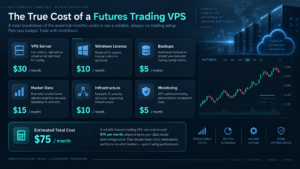
The advertised VPS price may not be your total cost. Windows licensing, backup retention, snapshots, additional IP addresses, data-transfer policies, higher resource tiers, managed support, security services, and dedicated hardware can change the monthly bill.
Your trading stack also includes costs outside the VPS: brokerage commissions, exchange fees, market-data subscriptions, platform subscriptions, add-ons, data feeds, APIs, trade copiers, and possibly third-party monitoring tools. When comparing the best futures trading VPS, calculate the total infrastructure cost rather than viewing the VPS in isolation.
Futures VPS Reliability and Security Checklist
Running a strategy on a remote server creates a system that must be maintained. Before selecting the best futures trading VPS, check how the provider handles backups, snapshots, DDoS protection, administrator access, operating-system updates, server monitoring, password security, remote desktop, support, planned maintenance, and incident communication.
Do not store more credentials on the server than necessary. Use strong unique passwords, multi-factor authentication where available, restricted access, and documented recovery procedures. Test how your platform behaves when the broker disconnects, market data stops, the VPS restarts, or an automated strategy loses synchronization with the live account.
Even the best futures trading VPS only reduces some local infrastructure risk; it does not replace strategy-level controls such as maximum position size, daily loss limits, stop logic, kill switches, order throttling, and manual emergency procedures.

For a broader trading-platform comparison, see our
Best Futures Trading Platforms 2026
guide.
Best Futures Trading VPS FAQ
What is the best futures trading VPS in 2026?
Our overall best futures trading VPS pick is ChartVPS for traders who want futures-specific infrastructure, Chicago availability, modern CPU hardware, and NinjaTrader-oriented support. TradingVPS is particularly attractive for value, while QuantVPS offers a broad range of futures-focused configurations.
Do I need a VPS for NinjaTrader?
No. NinjaTrader can run on a suitable local Windows computer. A VPS becomes useful when you want an always-on remote environment, need to reduce dependence on home power or internet, or want a network location closer to the infrastructure used by your broker and data feed.
Can NinjaTrader run on a Windows VPS?
Yes, provided the environment meets the platform’s requirements and the VPS provider permits the software. NinjaTrader’s current documentation lists Windows 11 or Windows Server 2016 or later 64-bit among its supported minimum operating-system environments.
How much RAM should a NinjaTrader VPS have?
For active use, 8 GB is a sensible baseline because it aligns with NinjaTrader’s recommended PC memory specification. More RAM may be appropriate for multiple charts, workspaces, backtests, optimizations, data feeds, and automated strategies.
Is 1 ms latency necessary for futures trading?
No. Many discretionary and slower systematic strategies do not depend on sub-millisecond connectivity. Strategy type, broker routing, platform health, data quality, execution logic, and slippage tolerance all matter. The best futures trading VPS should match your actual strategy rather than an arbitrary latency target.
Will a VPS eliminate slippage?
No. A VPS can improve network location and reliability, but slippage can result from market volatility, liquidity, queue position, order type, broker routing, and other execution factors. No legitimate VPS can guarantee zero slippage.
Can I run automated futures strategies 24/7 on a VPS?
A VPS can keep the trading platform online independently of your home computer, but the strategy should still be monitored. Software failures, broker disconnects, stale data, code errors, rejected orders, and synchronization issues remain possible.
Should I choose Chicago for CME futures?
Chicago is often a logical choice for CME-focused infrastructure, but test the path to your own broker and data feed. The geographically closest server is not automatically the best futures trading VPS if the network route to your actual trading stack is poor.
Final Verdict: Best Futures Trading VPS for 2026
For most serious automated futures traders, ChartVPS is our best overall choice because it combines futures-specific positioning, modern performance-focused hardware, Chicago infrastructure, and NinjaTrader-oriented features. TradingVPS is our value choice, and QuantVPS is particularly strong when you want to scale from a small setup toward multiple strategies or heavier resources.
TraderVPS is a premium trading-focused alternative. Cloudzy can reduce entry cost, FXVM provides broad geographic choice, and Kamatera gives technically capable users a customizable general-cloud option. The best futures trading VPS is ultimately the server that fits your platform, broker route, data feed, strategy workload, reliability requirements, and budget.
Do not buy a VPS because a provider promises that low latency will make you profitable. Infrastructure can reduce certain technical risks and delays, but it cannot create a trading edge or prevent market losses.